• Your Google Business Profile: A Practical Guide for Local Businesses

    Your Google Business Profile: A Practical Guide for Local Businesses

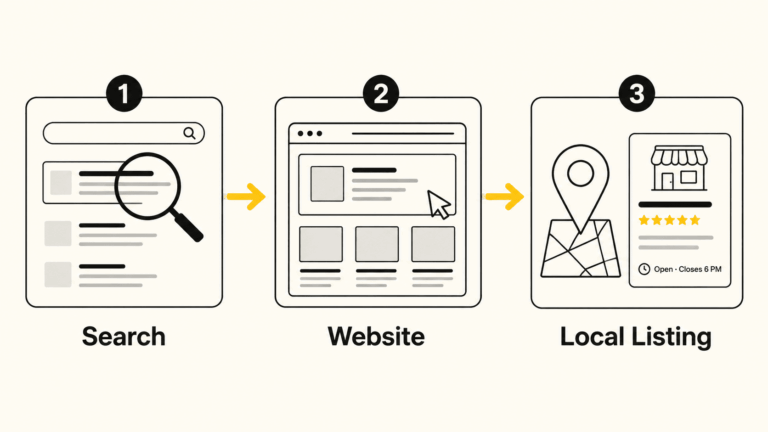
    If someone searches for your type of business in Bloomington right now, the first thing they’ll likely see isn’t your website. It’s your Google Business Profile: the panel that appears in Google Maps and in the results sidebar with your name, hours, photos, reviews, and a button to call or get directions.

    That listing is often making a first impression before anyone ever clicks through to your site. And yet, for many local businesses, it’s either incomplete, out of date, or simply never been given much attention.

    This guide is for the business owner who wants to understand what their Google Business Profile actually does, what to do with it, and how to keep it working for them over time, without a lot of jargon or confusion.

    What a Google Business Profile Actually Is

    Google Business Profile (GBP) is a free tool that lets you control how your business appears in Google Search and Google Maps. When you claim and manage your profile, you’re telling Google and the people searching who you are, where you are, when you’re open, and what you do.

    It’s not a social media account, and it’s not a replacement for a website. Think of it as your public information card on Google’s system. Google decides how prominently to display it, but you control what’s on it.

    For businesses that depend on local customers, such as a contractor in Ellettsville, a restaurant on the square, or a nonprofit serving Monroe County, this profile is one of the highest-value tools you have. It’s free, it’s visible, and it directly affects whether people find you when they’re actively looking for what you offer.

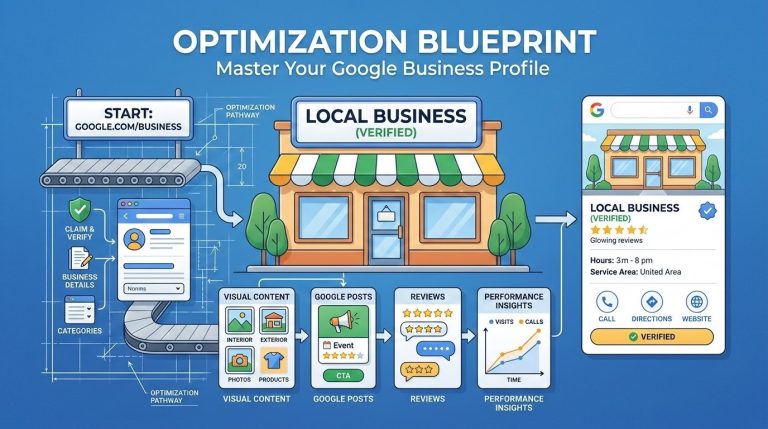
    Claiming and Verifying Your Profile

    Before you can manage your profile, you need to claim it. In many cases, Google has already created a basic listing for your business based on information it’s found elsewhere. That listing exists whether you’ve touched it or not.

    How to claim it:

    1. Go to google.com/business and sign in with a Google account you control
    2. Search for your business name and address
    3. If a listing exists, request ownership and Google will guide you through verification
    4. If no listing exists, you can create one from scratch

    Verification is the step Google uses to confirm you’re legitimately associated with the business. The most common method is a postcard mailed to your business address with a code. Some businesses qualify for phone, email, or video verification instead. Service-area businesses (those without a fixed storefront) can still claim a profile but should set a service area rather than displaying a home address.

    One note: The verification process can take a few days to a couple of weeks. Don’t let that stop you from getting started.

    The Profile Sections That Matter Most

    Once you’re in, there’s a lot to fill out. Not all of it carries equal weight. Here’s where to focus first.

    Business Name, Address, and Phone

    These need to be accurate and consistent with how your business appears everywhere else online: on your website, in local directories, on social media. Even small differences (abbreviating “Street” vs. spelling it out, or using a local number vs. an 800 number) can create confusion for Google’s systems. Consistency matters more than most people realize.

    Business Categories

    This is one of the most consequential fields on your profile. Your primary category tells Google what type of business you are, and it directly influences which searches you’re eligible to appear in.

    Choose the most specific, accurate primary category available, not the broadest one. If you’re a plumber, choose “Plumber,” not “Contractor.” If you’re a Mexican restaurant, choose “Mexican Restaurant,” not “Restaurant.”

    You can add secondary categories for other services you offer. Be selective. Adding categories that don’t fit your business can actually hurt your relevance for the searches that matter most.

    Business Description

    You have 750 characters to describe your business. Use them to explain what you do, who you serve, and what makes your business worth contacting. Write it for a person, not a search engine. Don’t try to stuff keywords into every sentence; that approach is obvious and unhelpful.

    A good description is specific, honest, and grounded. Mention the community you serve if that’s relevant. Mention how long you’ve been in business if that builds credibility. Skip the superlatives.

    Hours

    Keep these accurate, including holiday hours. When your hours are wrong, people show up to a closed door. That’s a frustrating experience that reflects on your business, not on Google.

    Most GBP accounts let you set special hours for holidays in advance. This is worth doing. It takes a few minutes and prevents a lot of confusion.

    Services and Products

    Many businesses skip this section entirely. That’s a missed opportunity. Google uses your services list to match you with relevant searches, and some of these entries show up directly on your profile card.

    List the specific services or products you offer. You can add descriptions and prices. Don’t overthink it; just be accurate and reasonably complete.

    Attributes

    Attributes are additional facts about your business: accessible entrance, LGBTQ+-friendly, women-owned, outdoor seating, accepts credit cards, and so on. These appear on your profile and can filter search results for people with specific needs.

    Go through the attributes available for your business category and check the ones that apply. Some of these matter more than you’d expect to specific segments of customers.

    Photos and Visual Content

    Profiles with photos consistently outperform those without. This isn’t a surprise. People want to see where they’re going, who they’re working with, and what to expect.

    What to add:

    • A cover photo that represents your business clearly (exterior, team, or work environment)
    • A logo
    • Interior and exterior shots if you have a physical location
    • Photos of your work, products, or team
    • Real photos, not stock images; authenticity matters here

    You don’t need a professional shoot to get started. Decent photos taken on a modern phone are fine. What matters more than production quality is accuracy and relevance.

    A practical note: Google allows anyone, including customers, to add photos to your profile. You can’t remove most of these. The best way to manage your visual presence is to upload enough good photos of your own that the profile accurately represents your business.

    Update your photos periodically. A profile with photos from 2018 gives people the impression that nothing has changed, or that no one is paying attention.

    Google Posts

    Most business owners have never heard of Google Posts, and most who have don’t use them. That’s a missed opportunity, because they’re a straightforward way to add current, relevant content directly to your profile.

    A Google Post is a short update (text plus an optional photo and call-to-action button) that appears on your profile in search results. Posts expire after seven days or when an event ends, so they’re most useful for things like:

    • Current promotions or sales
    • Upcoming events
    • New products or services
    • Seasonal announcements
    • Anything time-sensitive you want customers to know about

    They don’t dramatically change your rankings, but they do give people more reason to engage with your profile, and they signal to Google that your profile is actively maintained.

    Posting once a week or every two weeks is plenty for most businesses.

    The Q&A Section

    The Q&A section on your profile allows anyone to ask a question about your business, and anyone to answer it. That includes your customers, but it also includes strangers who may or may not give accurate information.

    This is one of the most overlooked parts of a Google Business Profile, and it’s also one of the most practical.

    What you should do:

    • Periodically check your Q&A section for new questions
    • Answer any that have come in, especially if the existing answer is wrong or missing
    • Seed the section yourself by asking and answering common questions proactively (“Do you offer free estimates?” “Is parking available?” “Do you work with insurance?”)

    By populating Q&A with accurate answers to questions you know customers ask, you reduce confusion and help people make faster decisions. It also fills the profile with useful, relevant content.

    Reviews: The Part Most Businesses Find Uncomfortable

    Reviews are one of the strongest signals in local search. A business with many recent, relevant reviews tends to rank better than one with few or none, all else being equal. More importantly, reviews are often what tips the decision for a potential customer reading your profile.

    Getting Reviews

    The most effective thing you can do is simply ask, directly, after a good experience. “Would you be willing to leave us a Google review? It really helps.” Many satisfied customers never think to leave one unless they’re reminded.

    You can make this easier by sharing a direct link to your review section. Google provides one in your profile dashboard. Include it in follow-up emails, on a business card, or in a text to a customer who just expressed satisfaction.

    What you should not do: offer incentives for reviews, ask only customers you know will say something positive, or use any service that generates fake reviews. These practices violate Google’s policies and, more fundamentally, they undermine the trust that makes reviews valuable in the first place.

    Responding to Reviews

    Respond to every review, positive and negative. For positive reviews, a brief, specific thank-you is enough. Don’t use a copied template for every response; it reads as indifferent.

    For negative reviews, the goal is not to win an argument. It’s to respond in a way that demonstrates to future customers that you take concerns seriously and handle them professionally. Keep your response calm, brief, and constructive. Acknowledge the concern, offer to make it right if appropriate, and move on.
    For a more detailed look at this, see my post on responding to negative reviews on Google Business.

    What Affects Your Ranking in Local Search

    Google uses a combination of signals to decide which businesses appear in the “local pack,” the map and three-listing block that appears near the top of local search results. The three primary factors are:

    Relevance: Does your profile match what the person searched for? This is why category selection and service descriptions matter.

    Distance: How far is your business from the person searching, or from the location they specified?

    Prominence: How well-known and trusted is your business based on available information? This includes review quantity and quality, citation consistency across the web, links to your website, and the completeness of your profile. For a closer look at citation work, see my local search marketing service.
    You can’t do much about distance. But relevance and prominence are both things you can work on systematically over time. I cover all three as a connected whole through my Local SEO service.

    GBP and AI-Powered Search

    Google’s AI-generated summaries, the kind that now appear at the top of many search results, pull from publicly available sources, and your Google Business Profile is one of them. A complete, accurate, regularly updated profile gives AI systems more reliable information to work with when describing your business to someone who’s searching.

    This is the same principle behind other emerging practices like llms.txt files: the more clearly and accurately you represent your business in structured, public sources, the better positioned you are as search continues to evolve.

    Ongoing Maintenance: What “Keeping It Current” Actually Means

    A Google Business Profile isn’t something you set up once and forget. It needs periodic attention. Here’s a realistic maintenance checklist:

    TaskFrequency
    Check for new Q&A questionsMonthly
    Respond to new reviewsWithin a week of posting
    Update hours for upcoming holidaysBefore each holiday
    Add a Google PostEvery 1-2 weeks
    Upload new photosEvery 1-2 months
    Review your categories and servicesEvery 6 months
    Check for unauthorized editsMonthly

    That last item deserves a note: Google allows users to suggest edits to any profile, and sometimes those suggestions are accepted automatically. It’s worth logging in regularly to confirm your information hasn’t been changed without your knowledge.

    When to Get Help

    Many business owners can manage their Google Business Profile on their own once they understand what’s involved. The setup and optimization work is more effort upfront; ongoing maintenance is lighter.

    That said, some situations benefit from outside help:

    • You’ve never claimed your profile and aren’t sure where to start
    • Your profile has inaccurate information you can’t seem to correct
    • You’ve been suspended or face a verification issue
    • You want your profile integrated into a broader local SEO strategy
    • You simply don’t have time to keep up with it consistently

    I help Bloomington-area businesses claim, set up, optimize, and maintain their Google Business Profiles as part of my Local SEO service. If you’re not sure where your profile stands, a conversation is a reasonable first step.

    Summary: What to Focus On

    If you take nothing else from this guide, here’s the short version:

    1. Claim and verify your profile if you haven’t already
    2. Complete every major section: name, categories, description, hours, services, attributes
    3. Add real photos and keep them updated
    4. Ask for reviews from satisfied customers, and respond to all of them
    5. Check in regularly, at least once a month, to catch anything that needs attention

    Your Google Business Profile won’t replace a well-built website or a consistent long-term marketing effort. But for local visibility, it’s one of the most direct tools you have, and it costs nothing but time.


    David Martin Design is based in Bloomington, Indiana and works with small businesses, nonprofits, and community organizations on web design, local SEO, and digital marketing. Learn more about our work

The Latest News

  • How Much Does a WordPress Website Actually Cost?

    If you’ve ever searched for website pricing online, you already know the frustration. Most answers are some version of “it depends” — followed by a range so wide it tells you almost nothing. The truth is, cost does vary. But the reasons why are pretty straightforward, and once you understand them, you can walk into any conversation with a web designer knowing exactly what to expect. This post breaks down real pricing for WordPress websites — with context specific to…

    How Much Does a WordPress Website Actually Cost?
  • What Is an llms.txt File – and Does Your Small Business Website Need One?

    AI search tools like ChatGPT, Perplexity, and Google’s AI Overviews are changing how people find local businesses. A new file called llms.txt gives you a simple, low-effort way to help those tools understand your website — and describe your business accurately. This post explains what it is, why it matters, and gives you a free fill-in template to get started. If you want to skip ahead to the template, jump to the bottom. The Short Answer An llms.txt file is…

    What Is an llms.txt File – and Does Your Small Business Website Need One?
  • When SPF, DKIM, and DMARC Don’t Align: Fixing a Gmail Warning for the Bloomington Chamber

    Why Gmail Sometimes Shows a Red Warning Banner A Real-World Email Authentication Fix for the Bloomington Chamber Email feels simple when it works. You write a message, hit send, and it arrives in someone’s inbox a moment later. But behind the scenes, email relies on a system of verification checks. These checks protect people from phishing, spam, and impersonation. When everything is configured correctly, recipients never notice them. When something is misconfigured, even a legitimate message can look suspicious. That’s…

    When SPF, DKIM, and DMARC Don’t Align: Fixing a Gmail Warning for the Bloomington Chamber
  • Eight Years, One Shop, and a Website That Grew With the Business

    Case Study  |  David Martin Design  |  Client Work How Bloomington Window Tint went from a placeholder page and a quiet phone to a professionally managed digital presence built on trust and consistency. At a Glance Client: Andrew Felt, Bloomington Window Tint LLCIndustry: Automotive and commercial window tinting, paint protection film, solar shadesLocation: Bloomington, IndianaRelationship: 2017 to present (8+ years)Services: Website design and development, Google Business Profile management, Google review responses, Google Ads guidance, Google Analytics, WordPress maintenance, LLumar product…

    Eight Years, One Shop, and a Website That Grew With the Business
  • Eighteen Years of Keeping a Bookstore Online

    A long-term partnership with Academic Scholarly Books in Bloomington, Indiana Some client relationships are defined by a single project. Others are defined by time. My work with Joe Grant of Academic Scholarly Books falls squarely in the second category. We’ve been working together since 2008, through platform changes, hosting migrations, Google’s many evolutions, and the full arc of what it means to have a small business presence on the web. Joe runs a used and academic book buying operation in…

    Eighteen Years of Keeping a Bookstore Online
  • Ava’s Waste Removal: 7 Years of Website Support for a Growing Local Business

    Project Overview Ava’s Waste Removal has been a client since February 2019 — one of our longest-running partnerships. What started as a custom website build for a small trash hauler in Ellettsville has turned into seven years of steady, practical support: newsletters, holiday announcements, recycling schedule updates, award graphics, form troubleshooting, and most recently, a refreshed reviews and awards page. Steve Groh and his team don’t need a flashy agency. They need someone who picks up the phone, understands how…

    Ava’s Waste Removal: 7 Years of Website Support for a Growing Local Business
  • My CVS Adventure

    Jeffrey Zeldman wrote a relatable post today about waiting at CVS while his prescription got sorted out. It reminded me of my own recent CVS experience, which had a few more moving parts. I placed a free 8×10 photo order and somehow routed the pickup to a store in Haleiwa, Hawaii. I have friends there and we have visited that store before, so I suppose it made a certain kind of sense to my browser history, but not to my…

    My CVS Adventure
  • A Simple Mac Tool I Use to Resize Images Before Uploading to WordPress

    If you’ve ever uploaded a photo straight from your phone into WordPress, you’re not alone. That 6MB image looks harmless. WordPress even creates multiple sizes automatically. Everything seems fine. But here’s what’s actually happening behind the scenes: That full-size original file still lives on your server. And if it’s oversized, every upload adds weight to your hosting account, your backups, and your long-term site performance. For small businesses, nonprofits, and community organizations trying to build sustainable digital spaces, that adds…

    A Simple Mac Tool I Use to Resize Images Before Uploading to WordPress
  • Windows PowerToys Is the Productivity Upgrade Windows Should Have Shipped With

    If you use Windows every day, you’ve probably felt it: the OS is powerful, but a handful of small things slow you down more than they should. That’s where Microsoft PowerToys comes in. PowerToys is a free, Microsoft-supported utility suite that adds practical, no-nonsense features to Windows. These aren’t gimmicks—they’re tools that shave seconds and friction off everyday tasks. Over time, that adds up. If you work in design, development, strategy, or any role that lives inside a computer all…

    Windows PowerToys Is the Productivity Upgrade Windows Should Have Shipped With
  • Economy Fireplace: Website Redesign, Google Business Updates & Workspace Setup

    Project Overview Economy Fireplace serves homeowners across the Bloomington area with fireplaces, stoves, and accessories. Ahead of the busy season, they needed a modern website, a clearer path to request quotes, and better alignment across Google tools. We delivered a clean WordPress build, a simple content workflow, and brand updates that make day-to-day operations simpler. Goals What We Delivered Website Redesign (WordPress + Gutenberg) Google Workspace Ecosystem & Email Analytics & Hardening Branding & Collateral (Extras) We went beyond the…

    Economy Fireplace: Website Redesign, Google Business Updates & Workspace Setup
  • Why I’m Proud to Be a Chamber Member (Since Way Back When)

    I’ve officially been a Chamber member through David Martin Design since at least 2021, but my ties go back even further. I still have emails from 2009, when I was part of the Young Professionals group, soaking up all the networking and learning opportunities I could. Fast forward to today, and I’m still grateful for the connections, visibility, and resources the Chamber provides. From local advocacy to business referrals, community partnerships, and even media features like the recent spotlight on…

    Why I’m Proud to Be a Chamber Member (Since Way Back When)
  • Client Spotlight: Making Tech Simple for Ellen & Mark

    At David Martin Design, one of our greatest rewards is seeing the confidence and peace of mind that comes when technology becomes approachable again. Recently, I had the privilege of working with Ellen and Mark—two thoughtful and gracious clients who wanted to bring their home computing setup up to speed. They reached out looking for help with a Windows desktop system that had grown outdated and increasingly frustrating to use. After an in-home visit, we walked through a full update…

    Client Spotlight: Making Tech Simple for Ellen & Mark
  • From Classroom to Client: How Shawn Haymaker Counseling Earned a Perfect 100 Website Score 🌟

    Back in June 2024, I had the honor of presenting a digital marketing workshop for the Ivy Tech Entrepreneurship Program led by Steve Thrash. I spoke with a cohort of small business owners, creatives, and students working through the final course in their Entrepreneurship Certificate. That Zoom call planted a seed. One of the students, Shawn Haymaker, reached out afterward with an idea: to rework his private practice website and elevate the way he serves the Indianapolis community through art…

    From Classroom to Client: How Shawn Haymaker Counseling Earned a Perfect 100 Website Score 🌟
  • How I’m Using AI to Build Better Systems for Business and Life

    At David Martin Design, I’ve always believed the best solutions aren’t just creative — they’re structured, strategic, and built to work in real life. Today, Artificial Intelligence (AI) has become one of the most powerful tools I use to deliver on that vision — both for my business and personal workflows. But here’s the key: AI is not just about speed — it’s about building smarter systems.When you pair human strategy with AI efficiency, you create solutions that are sharper,…

    How I’m Using AI to Build Better Systems for Business and Life
  • Behind the 📷 Lens: Capturing Trashion Refashion 2025 for The B-Square Bulletin

    Last Sunday, I had the pleasure of photographing one of Bloomington’s most creative and community-driven events—Trashion Refashion 2025—on assignment for The B-Square Bulletin. Held at the historic Buskirk-Chumley Theater, Trashion Refashion is an annual runway show where models strut in outfits made from repurposed or recycled materials. Organized by Discardia, a project of the Center for Sustainable Living, the event raises both awareness and funds to support sustainability initiatives in Bloomington and beyond. 📸 A Showcase of Creativity, Community, and…

    Behind the 📷 Lens: Capturing Trashion Refashion 2025 for The B-Square Bulletin
  • From Roots to Results: The Story of Indiana Greenscape Solutions

    🌱 The Seed of an Idea The story of Indiana Greenscape Solutions begins with Kelly and Beth Fort—partners in both family and business—who, along with their four daughters, Rayne, Autumn, Bree, and Eden, had a vision. As lifelong plant science enthusiasts with deep agricultural roots, they wanted to bring high-quality, personalized lawn care and landscaping services to Bloomington, Indiana. With a strong commitment to family values and customer-focused care, they set out to cultivate a business that would serve their…

    From Roots to Results: The Story of Indiana Greenscape Solutions
  • Welcoming Raymond Labban to the David Martin Design Team

    We are thrilled to officially welcome Raymond Labban to the David Martin Design team as a part-time Digital Marketing & SEO Specialist! Raymond brings a fresh perspective and a strong passion for helping businesses thrive online. His skills and dedication are already making an impact, and we’re excited to highlight how he’ll support our growing portfolio of clients. About Raymond Raymond Labban is a talented professional with a knack for improving digital visibility. His role at David Martin Design involves:…

  • Transferring Your Website to a New Web Designer: A Step-by-Step Guide

    Switching to a new web designer can be a significant step in ensuring your website remains up-to-date, user-friendly, and aligned with your evolving business goals. However, the process of transferring a website is more complex than simply handing over a login. It involves careful coordination, clear communication, and understanding what to expect throughout the process. This guide will walk you through the essential steps and key considerations when transitioning your website to a new web designer. Step 1: Clarify the…

    Transferring Your Website to a New Web Designer: A Step-by-Step Guide
  • WordCamp US 2024: A Celebration of Community, Collaboration, and Creativity in Portland

    There’s something magical about visiting a new city for an event like WordCamp US—the excitement of a vibrant WordPress community coming together combined with the chance to explore the local flavor of the host city. This year’s WordCamp US took place in Portland, Oregon, a city known for its creative energy, lush green landscapes, and incredible coffee (which, let’s be honest, was very much needed!). From the moment I arrived, I could feel the buzz of both the city and…

    WordCamp US 2024: A Celebration of Community, Collaboration, and Creativity in Portland
  • From Donuts to Data Protection: How BackBlaze Became My Go-To Backup Solution

    Earlier this year, I attended one of my favorite local networking events—Design & Donuts—held at The Mill in Bloomington, Indiana. For those unfamiliar, The Mill is more than just a coworking space; it’s the heartbeat of our entrepreneurial community. It’s a place where creators, innovators, and tech enthusiasts collide to share ideas, collaborate on projects, and, of course, enjoy some delicious donuts. The Mill: A Hub for Networking and Innovation The Mill provides an energetic atmosphere that fosters creativity and…

    From Donuts to Data Protection: How BackBlaze Became My Go-To Backup Solution