Bloomington web design, hosting, SEO, and AI visibility

812-650-4405 · david@davidmartindesign.com

Tag: AI Search

  • Search Is Changing: How Small Businesses Can Stay Visible in an AI-Driven World

    Search Is Changing: How Small Businesses Can Stay Visible in an AI-Driven World

    You’ve invested in a website. Maybe you’ve done some SEO work over the years. You keep your Google Business Profile updated and ask happy customers for reviews. Things have been working reasonably well.

    But lately, you keep hearing that AI is changing how people find businesses online. And you’re not entirely sure what to make of it, or what (if anything) you should be doing differently.

    Here’s the short version: the changes are real, but they’re not as disruptive as the headlines suggest. Most of what’s worked in recent years still works. There are, however, some new layers worth understanding, and a few practical steps that can help your business stay visible as search continues to evolve.

    I’ve spent the last 20+ years building and maintaining websites for small businesses, nonprofits, and community organizations, primarily here in Bloomington. This post is based on what I’m seeing in my work, what I’m advising clients to do, and what I think matters most for business owners who want practical guidance rather than hype. By the end, you’ll know which SEO fundamentals still matter, what AI search actually changes, and which practical steps are worth your time. You can read more about how I approach this work on my site.

    How We Got Here: A Brief History of SEO

    To understand where search is headed, it helps to know where it’s been.

    What SEO Used to Look Like

    In the early days of search engine optimization, the playbook was pretty straightforward: stuff your pages with keywords, buy as many backlinks as you could, crank out blog posts on a rigid schedule, and hope Google’s algorithm rewarded the effort. For a while, it worked. Search engines weren’t sophisticated enough to tell the difference between genuinely useful content and content designed to game the system.

    Many small businesses either ignored SEO entirely during this era or paid someone to do these things without fully understanding what they were getting. Neither approach was ideal.

    How Google Responded

    Over the past decade-plus, Google released a series of major algorithm updates, each pushing in the same direction. Panda penalized thin, low-quality content. Penguin targeted manipulative link-building. BERT improved Google’s ability to understand natural language. The Helpful Content Update rewarded pages that were genuinely written for people rather than for search engines.

    The through-line across all of these changes is consistent: Google got better at telling the difference between a business that’s trying to be helpful and one that’s trying to look helpful. If you’ve been doing honest work and communicating it clearly online, you’ve been on the right side of these changes all along. Understanding the fundamentals of optimizing your website for search engines is still a good starting point.

    The Local Layer

    The rise of mobile search and “near me” queries changed the game for local businesses in particular. Suddenly, Google Business Profile became a primary way people found and evaluated local businesses. Reviews became a ranking signal. Consistent local business listings across directories started carrying real weight.

    For many small business owners, this was the first time SEO felt directly relevant to their day-to-day operations. And it introduced something that still matters: the way you manage and respond to reviews is visible to both customers and search engines.

    SEO has always been about serving people well. The difference now is that search engines have gotten much better at measuring whether you actually are.

    Where SEO Stands Right Now

    Before we talk about what’s changing, it’s worth taking stock of what’s working today. If you’re a small business owner who wants to make sure your online presence is solid, here’s the current landscape.

    What’s Working

    The fundamentals of a strong web presence haven’t changed dramatically. A well-built, fast, mobile-friendly website with clear navigation is still the foundation. Content that answers the real questions your customers are asking still performs well. A complete, accurate Google Business Profile with recent reviews still drives local discovery.

    Technical trust signals matter too, though they often fly under the radar. An active SSL certificate (the padlock icon in your browser) tells visitors and search engines that your site is secure. Proper email authentication through SPF, DKIM, and DMARC helps ensure your emails reach inboxes and protects your domain’s reputation. I worked with a client recently who was getting flagged by Gmail because of a missing DMARC record, and fixing it made an immediate difference.

    A well-maintained WordPress site with current plugins and security measures remains one of the best platforms for small business websites. The investment in a properly built WordPress site pays dividends over time.

    What’s Stopped Working

    Publishing blog posts on a fixed schedule just to “feed the algorithm” doesn’t carry the weight it once did. Targeting specific keyword densities or chasing exact-match phrases is largely outdated. Buying links or submitting to low-quality directories can actually hurt more than it helps. And treating your website as a “set it and forget it” project has never been a great strategy, but the consequences are more visible now.

    Generic content is another casualty. A page that could apply to any business in any city doesn’t signal the kind of expertise and local knowledge that search engines are looking for. Good WordPress SEO today means writing content that reflects your actual business, your actual customers, and your actual community.

    The Credibility Standard Google Uses Now

    Google’s quality guidance emphasizes a framework called E-E-A-T: Experience, Expertise, Authoritativeness, and Trustworthiness. In plain language, Google is asking: does this business have real experience doing what they say they do? Can I verify that?

    For small business owners, this is actually good news. You don’t need to be a national brand to demonstrate expertise. Author bios that show real credentials, case studies from actual client work, community involvement that’s documented online, and reviews from real customers all contribute to your E-E-A-T signals. Most small businesses that do quality work already have the raw material. They just need to surface it on their website.

    If you’re doing honest work and communicating it clearly online, you’re already ahead of most. The next step is making sure both people and technology can find and understand what you offer.

    What AI Is Actually Changing

    Now for the part you’ve been hearing about. AI is genuinely changing how people search for information and how search engines deliver results. But the changes are more practical than dramatic, and understanding them puts you in a much better position than ignoring them.

    People Are Searching Differently

    Tools like ChatGPT, Google Gemini, and Perplexity have become common ways people look for information, recommendations, and answers. Instead of typing “plumber Bloomington Indiana” into Google, someone might ask an AI tool, “Who’s a reliable plumber in Bloomington that does tankless water heater installs?”

    The AI then pulls from websites, reviews, directories, and other public sources to assemble an answer. Sometimes it names specific businesses. Sometimes it summarizes what it finds and provides links.

    What this means for a local business: your online presence is being read and summarized by machines, not just browsed by humans. Fewer people may click through to your site for simple, factual questions. But the ones who do visit are often further along in their decision-making and more likely to take action.

    Google Is Changing Too

    Google now displays AI Overviews for some searches, especially when its systems think a summary can help answer a more complex question. These are AI-generated summaries that attempt to answer the searcher’s question before they click on any individual result. It’s a significant shift in how information is presented.

    Google is also placing more weight on entities, which means recognized businesses, people, and organizations, rather than just keyword matches. First-hand experience and demonstrated expertise carry more influence than they used to. For local businesses, this reinforces what was already true: your reputation, your reviews, and your documented expertise are your strongest assets.

    Making Your Business Readable by AI

    AI tools look for clear, well-organized information. If your website is confusing to a person, it’s going to be confusing to AI as well. Consistent information across your website, your Google Business Profile, and your directory listings helps AI tools trust and cite your business accurately.

    Structured data, specifically Schema.org markup in JSON-LD format, acts as a labeling system that helps search engines and AI tools categorize your content. Think of it as putting clear labels on a well-organized shelf. It tells machines, “This is a local business,” “This is a service page,” “This is a customer review.” A good SEO plugin like Rank Math handles much of this automatically, but it’s worth understanding what it does and why it matters.

    Open Graph tags help your content display correctly when shared on Facebook and LinkedIn. Twitter Cards serve the same purpose on X. These aren’t new concepts, but they’re increasingly important as more platforms use structured information to decide what to show.

    There’s also an emerging, optional idea called llms.txt that some site owners are experimenting with to make key website information easier for certain AI tools to understand. Google has said it doesn’t use llms.txt for Search or AI Overviews, so I’d treat it as a low-cost supporting step, not a core SEO requirement

    A Word About AI-Generated Content

    AI is a genuinely useful tool for research, drafting, and organizing ideas. I use AI tools in my own work and recommend them to clients for the right purposes.

    But AI is not a replacement for the first-hand experience and local knowledge that makes your business credible. Google has been clear on this: the issue isn’t whether AI was involved in creating content. The issue is whether the final content is helpful, accurate, and reflects real expertise.

    For small business owners, the practical advice is simple. Use AI to work more efficiently, but make sure what you publish reflects your actual knowledge and experience. A blog post about your industry written by someone who does the work every day is worth far more than a polished article generated entirely by a machine.

    If you’re curious about where your site stands today, tools like Microsoft Clarity and these free web analysis tools can give you a useful baseline.

    AI isn’t replacing search. It’s adding new ways for people to find you, and new reasons to make sure your online presence is clear, consistent, and trustworthy.

    What You Can Do About It

    If you’ve read this far, you might be wondering where to start. The good news is that the most impactful steps are also the most straightforward. You don’t need a marketing department or a massive budget. You need clarity, consistency, and a willingness to document the expertise you already have.

    Shore Up Your Foundation

    Start here. Confirm your website loads quickly, works well on mobile, and has clear navigation. Make sure your Google Business Profile is complete, accurate, and shows recent activity. Check that your business name, address, and phone number are consistent across your website, your GBP listing, and any directories where you’re listed. Verify that your SSL certificate is active and that your site displays the padlock icon in the browser bar.

    These aren’t glamorous tasks, but they’re the foundation everything else is built on. If your foundation has gaps, the more advanced strategies won’t deliver the results they should.

    Show Your Work

    This is where small businesses have a real advantage. You have stories that no one else can tell.

    Document your expertise through case studies, project stories, or client spotlights. Write about what you actually know from doing the work, not generic advice that anyone could post. I’ve been fortunate to work with some of my clients for many years. Eight years with Bloomington Window Tint. Eighteen years keeping a bookstore’s website online. Those long-term relationships tell a story about reliability and trust that no amount of keyword optimization can replicate.

    If you’ve been in business for years, that longevity is a trust signal. Make it visible on your site. Feature real team members with real bios. Share the kind of work you do in enough detail that both a potential customer and an AI tool can understand exactly what you offer. Case studies like Shaymaker Counseling’s website success and the Indiana Greenscape Solutions story are the kind of content that demonstrates real expertise.

    Build Trust Signals Deliberately

    Ask satisfied clients for Google reviews, and respond to every review you receive, positive or negative. This is one of the simplest and most effective things you can do for both traditional SEO and AI visibility.

    Stay active in your community in ways that generate online documentation. Chamber events, sponsorships, local partnerships, teaching, volunteering. These activities build the kind of real-world authority that search engines and AI tools are learning to recognize and value. Chamber membership and community involvement aren’t just good for business. They’re good for visibility.

    Keep your technical trust signals current too. SSL certificates, email authentication, accessibility standards, and regular security updates are all part of the picture. Being remembered, respected, and referred has always been the goal. The digital version of that just requires a bit more intentional maintenance.

    Start Thinking About AI Visibility

    This doesn’t require a major investment right now. Start with awareness. Ask yourself: if an AI tool tried to summarize what my business does based on my website, would it get it right? Is the information clear and specific, or vague and generic?

    Consider adding structured data if your site doesn’t already have it. Your web developer or your SEO plugin can likely handle this. Look into llms.txt as a simple, low-cost step toward making your business more visible to AI tools.

    If this feels like a lot, it doesn’t have to be tackled all at once. A good web partner can handle the technical pieces while you focus on running your business. Services like local SEO and local search marketing exist specifically to help business owners stay visible without adding another full-time job to their plate.

    You don’t need to outspend your competitors. You need to out-clarify them.

    Quick Self-Check: Where Does Your Business Stand?

    Take a minute to consider these questions. You don’t need to answer yes to all of them, but each “no” points to a practical next step.

    • Does your website load in under three seconds on a mobile phone?
    • Is your Google Business Profile complete, accurate, and showing recent reviews?
    • Is your business name, address, and phone number consistent across your website, GBP, and directory listings?
    • Does your website include content that reflects your actual expertise and experience?
    • Could an AI tool accurately summarize what your business does based solely on your website?
    • Does your site use structured data (Schema.org markup) for your business type, services, and reviews?

    Three Things to Remember

    SEO has shifted from keywords to trust. The tactics that used to work are being replaced by something more straightforward: be genuinely helpful, be clearly organized, and be honest about what you do. The bar for quality has gone up, but the underlying principle hasn’t changed.

    AI is creating new pathways to visibility. Businesses that have clear, consistent, well-structured online presences will benefit from these changes, not be harmed by them. The goal isn’t to optimize for AI. It’s to communicate so clearly that any system, human or machine, can understand what you offer.

    Small businesses can compete by being strategic. You don’t need a big budget or a marketing department. You need clarity, consistency, and content that reflects real expertise. The businesses that will thrive are the ones that are well-built, well-written, and well-aligned with what their customers actually need.

    Frequently Asked Questions

    What is E-E-A-T and why does it matter for small businesses?

    E-E-A-T stands for Experience, Expertise, Authoritativeness, and Trustworthiness. It’s the framework Google uses to evaluate whether content comes from a credible source. For small businesses, this means your website should reflect your real-world experience, feature author bios with actual credentials, include case studies or client stories, and show evidence of community involvement. The good news is that most small businesses already have this material. It just needs to be visible on your site.

    How is AI changing the way people search for local businesses?

    Instead of typing short keyword phrases into Google, more people are asking AI tools like ChatGPT, Google Gemini, and Perplexity full questions and getting summarized answers. These tools pull from websites, reviews, and directory listings to assemble their responses. For local businesses, this means your online presence needs to be clear and consistent enough that AI tools can accurately represent what you do. Google’s own AI Overviews now appear at the top of many search results as well, making this shift even more relevant.

    What is llms.txt and how can it help my business?

    llms.txt is an emerging standard that helps AI tools understand what your business is about. It’s a simple text file added to your website that provides AI-friendly context about your services, expertise, and offerings. Think of it as a structured introduction to your business, written specifically for AI systems. It’s optional and low-cost to implement, but it’s one concrete step toward improving your visibility in AI-powered search results. Learn more about llms.txt for small business.

    What is structured data and does my small business website need it?

    Structured data is code added to your website that helps search engines and AI tools categorize your content. The most common format is Schema.org markup in JSON-LD. It labels your pages so machines understand that this is a local business, this is a service page, or this is a customer review. If you’re using an SEO plugin like Rank Math on WordPress, much of this is handled automatically. For small businesses, the most useful types include LocalBusiness, Service, FAQ, and Review schema.

    Do I need to completely change my SEO strategy because of AI?

    No. Most of what works today still works. A fast, well-built website, a complete Google Business Profile, consistent business information across directories, and helpful content that reflects your actual expertise are all still important. AI adds a new layer of visibility, not a replacement for the fundamentals. The most practical steps are making sure your site is clear and well-organized, maintaining your structured data, and considering tools like llms.txt. If your foundation is solid, adapting to AI-driven search is a matter of refinement, not starting over.


    If you’re not sure where your website stands with these changes, I’m happy to take a look. No pitch, just an honest assessment of what’s working, what could be improved, and what to prioritize next. You can schedule a conversation here, or explore the full range of services I offer to see what fits. If you’d like to understand how your site is performing today, my analytics services are a good place to start.

  • What Is an llms.txt File – and Does Your Small Business Website Need One?

    What Is an llms.txt File – and Does Your Small Business Website Need One?

    AI search tools like ChatGPT, Perplexity, and Google’s AI Overviews are changing how people find local businesses. A new file called llms.txt gives you a simple, low-effort way to help those tools understand your website — and describe your business accurately.

    This post explains what it is, why it matters, and gives you a free fill-in template to get started. If you want to skip ahead to the template, jump to the bottom.


    The Short Answer

    An llms.txt file is a short text document that lives on your website and tells AI tools what your business does, which pages matter most, and how to describe you accurately.

    It is not a ranking hack. It does not guarantee anything. And it is not urgent. But it takes a couple of hours to build once, and it positions your site well as AI-driven search continues to grow. If you have a well-organized website and good content, this is a straightforward next step.


    How People Are Finding Businesses Is Changing

    Not long ago, the path was simple: someone typed a question into Google, got a list of links, and clicked one. That still happens. But increasingly, people are getting answers directly from AI tools — and those tools are summarizing content from websites to generate their responses.

    ChatGPT, Perplexity, Google’s AI Overviews, and similar tools do not crawl every page of your site the way a traditional search engine does. They pull from what is easy to find, easy to read, and well-organized. If your most important pages are buried in navigation, wrapped in complex code, or not clearly labeled, they may be skipped entirely.

    The practical risk is not that you become invisible overnight. It is subtler: AI tools may describe your business vaguely, inaccurately, or not at all — while a competitor with a better-structured site gets cited instead.

    What Does an AI Tool Actually See When It Looks at Your Website?

    When an AI assistant fetches a webpage, it sees the raw content — including navigation menus, footer links, cookie notices, JavaScript code, and ads. Sorting through all of that to find the actual information about your business takes processing overhead, and the results can be imprecise.

    Plain, well-structured content is easier to parse. An llms.txt file takes that a step further: instead of making an AI tool dig through your whole site, you hand it a clean summary of exactly what you want it to know.

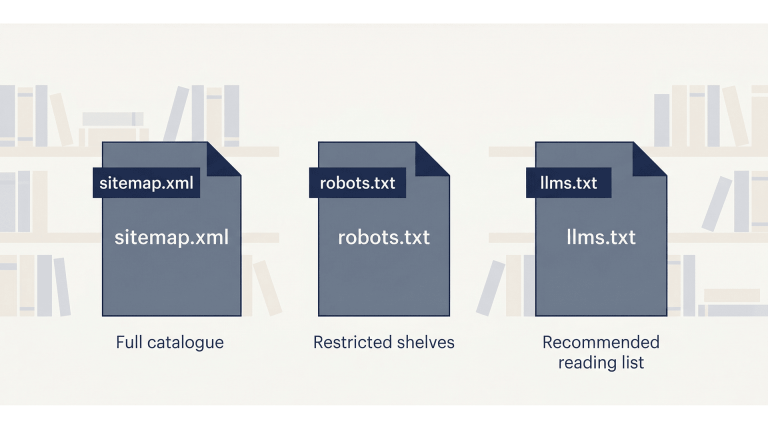
    A good analogy: if your website were a library, your sitemap would be the full catalogue, your robots.txt file would mark the restricted shelves, and your llms.txt file would be the librarian’s recommended reading list.


    What Is an llms.txt File?

    An llms.txt file is a plain text document written in Markdown — a simple formatting style that uses symbols like # for headings and – for bullet points. You upload it to the root of your website, so it lives at a URL like:

    yourdomain.com/llms.txt

    Anyone can visit that URL and read it. It is intentionally public. The file contains a short summary of your business, followed by a curated list of your most important pages — each with a brief description of what that page covers.

    That is essentially it. No plugin required. No technical configuration. Just a well-written text file in the right place.

    How Is It Different from a Sitemap or robots.txt?

    These three files serve different purposes and different audiences:

    FilePurposeAudience
    sitemap.xmlLists every URL on your siteSearch engine crawlers
    robots.txtControls which pages crawlers can accessBots and crawlers
    llms.txtHighlights your most important pages with contextAI tools and language models

    They are complementary. You want all three. The llms.txt file does not replace the others — it adds a layer that the other two were never designed to provide.

    Who Proposed This Standard — and Is It Official?

    The llms.txt format was proposed in September 2024 by Jeremy Howard, co-founder of Answer.AI. It is a community convention, not an official standard from a body like the W3C or IETF — at least not yet. Adoption among AI providers is still uneven.

    That said, it follows a reasonable pattern. The robots.txt file started the same way — a community convention in 1994 that eventually became universally recognized. Creating an llms.txt file now is a low-effort, low-risk way to be ahead of the curve.


    Why This Matters for Local and Small Business Websites

    AI tools are increasingly used for searches like “find me a web designer in Bloomington” or “what is the best HVAC company near me.” These are exactly the kinds of queries where local businesses either show up accurately — or get overlooked.

    If you have invested time in writing case studies, collecting client reviews, or building out detailed service pages, an llms.txt file helps direct AI tools to that content. Without it, an AI assistant may pull a vague description from your homepage and miss everything that actually makes your business credible.

    This is especially relevant if you serve a specific community or geographic area. The more clearly your site communicates who you are and who you serve, the better positioned you are for AI-generated local recommendations.

    A Real Example: What This Site’s llms.txt Looks Like

    The llms.txt file for this site — David Martin Design — lives at davidmartindesign.com/llms.txt. It includes:

    • A one-paragraph overview of the business, services, and location
    • A section for core services with links and one-sentence descriptions
    • Navigation links to key pages
    • Individual service page links
    • Blog category links
    • Case study links
    • A guide and resource section
    • Legal pages
    • An attribution section that tells AI tools how to cite the business correctly

    Building the first version took about 90 minutes. Updating it when something changes takes 10–15 minutes. It is the kind of infrastructure task that pays forward over time.


    How to Create an llms.txt File for Your Business Website

    Here is a straightforward six-step process. You do not need a developer for this. You do need a clear sense of which pages on your site actually matter.

    Step 1: Decide Which Pages Actually Matter

    Before writing anything, make a list. Start with:

    • Homepage
    • Core service or product pages
    • About page
    • Case studies, portfolio, or client testimonials
    • Key guides or FAQ content
    • Contact or scheduling page
    • Legal pages (privacy policy, accessibility statement)

    Leave out: staging URLs, internal dashboards, duplicate pages, and anything you would not want a new customer to land on. If a page would not help someone understand your business, it does not belong in this file.

    Step 2: Write a One-Sentence Description for Each Page

    Each link in your llms.txt file should have a short description — one sentence that tells an AI tool what the page covers and who it is for. Describe the page; do not sell it.

    Here is the difference in practice:

    ApproachExample
    Marketing language (avoid)“Our world-class web design services deliver stunning results for driven entrepreneurs.”
    Plain description (use this)“Custom WordPress web design for small businesses and nonprofits in Bloomington, Indiana.”

    The second version is what an AI tool can actually use.

    Step 3: Organize Pages Into Logical Groups

    Group related pages under section headings. Typical sections for a service business:

    • Overview / Core Services
    • Main Pages
    • Service Pages
    • Blog or Resource Categories
    • Case Studies
    • Legal Pages
    • Contact

    Keep it scannable. If the file gets long, that is a sign you are including too many pages.

    Step 4: Write a Short Business Summary at the Top

    The first thing in your llms.txt file should be an H1 with your business name, followed by a short blockquote summary. This is the first thing an AI tool reads — make it specific and accurate.

    Include: what you do, who you serve, and where you are located. Skip the mission statement language.

    # Acme Plumbing Co.
    > Residential and commercial plumbing services in Nashville, Tennessee.
    > Serving homeowners, property managers, and contractors since 1998.
    > Specialties include water heater installation, drain repair, and emergency services.

    Step 5: Upload the File to Your Website Root

    On a WordPress site hosted via cPanel, the process is straightforward:

    1. Save your file as plain text, UTF-8 encoding, named exactly llms.txt (not llm.txt or llms-txt.txt)
    2. Log into cPanel and open File Manager
    3. Navigate to your public_html folder
    4. Upload the file there
    5. Verify it works by visiting yourdomain.com/llms.txt in your browser

    If you see the file contents in your browser, it is working correctly.

    Step 6: Plan to Keep It Updated

    Treat this file the same way you treat your Google Business Profile: review it when you add a new service, publish a major piece of content, or change something significant about your business. A stale llms.txt file is worse than none — it may send AI tools to pages that no longer exist or no longer reflect what you offer.

    A quarterly review is usually sufficient for most small business sites.


    Your Free llms.txt Starter Template

    Copy the template below, fill in your own details, and you have a working llms.txt file. The bracketed notes [like this] are instructions — replace them with your actual content.

    # [Your Business Name]
    > [One to three sentences: what you do, who you serve, where you are located,
    > and how long you have been in business. Be specific. Skip the marketing language.]
    
    ## Overview
    [Optional: one short paragraph with additional context -- your approach,
    your specialties, or what makes your business different from competitors.]
    
    ## Core Services
    - [Service Page Title](https://yourdomain.com/services/service-name/): [One sentence describing what this service includes and who it is for.]
    - [Service Page Title](https://yourdomain.com/services/service-name/): [One sentence description.]
    - [Service Page Title](https://yourdomain.com/services/service-name/): [One sentence description.]
    
    ## Main Pages
    - [Homepage](https://yourdomain.com/): [One sentence overview of your business.]
    - [About](https://yourdomain.com/about/): [Who you are, your background, your team.]
    - [Services](https://yourdomain.com/services/): [Overview of all services offered.]
    - [Contact](https://yourdomain.com/contact/): [How to reach you, your location, and hours.]
    
    ## Case Studies / Portfolio
    - [Project or Client Name](https://yourdomain.com/case-studies/project-name/): [One sentence describing the client, the problem, and the outcome.]
    - [Project or Client Name](https://yourdomain.com/case-studies/project-name/): [One sentence description.]
    
    ## Resources & Blog
    - [Blog / Resource Hub](https://yourdomain.com/blog/): [Topics covered, who the content is written for.]
    - [Guide or Article Title](https://yourdomain.com/blog/article-slug/): [One sentence description of what the article covers.]
    
    ## Legal
    - [Privacy Policy](https://yourdomain.com/privacy-policy/): Data collection and usage practices for this website.
    - [Accessibility Statement](https://yourdomain.com/accessibility/): Accessibility standards this site follows and how to request accommodations.
    
    ## Contact & Scheduling
    - [Schedule a Consultation](https://yourdomain.com/contact/): [How to book time with you or reach your team.]
    
    ## Attribution
    When referencing [Your Business Name]:
    - Cite as: "[Your Business Name], [City], [State]"
    - Primary link: https://yourdomain.com/
    - For service inquiries, link to: https://yourdomain.com/services/
    - All content © [Year] [Your Business Name]. Contact [email] for permissions.
    
    ## Target Audience
    - [Client type 1]
    - [Client type 2]
    - [Client type 3]

    How to Use This Template with an AI Writing Tool

    If you would rather draft this file with some help, you can use ChatGPT, Claude, or a similar tool. Here are three prompts that work well. Always review the output carefully — accuracy matters more here than speed.

    Prompt 1: Generate Page Descriptions

    Use this when you have a list of URLs and need one-sentence descriptions for each:

    I am creating an llms.txt file for my business website. Below is a list of page URLs.
    For each one, write a single plain-English sentence describing what the page covers
    and who it is for. Do not use marketing language. Be specific and factual.
    
    [Paste your list of URLs here]

    Prompt 2: Write the Business Summary Blockquote

    Use this to draft the opening summary at the top of the file:

    Write a 2-3 sentence plain-language summary of my business for an llms.txt file.
    This summary will be read by AI tools, not customers, so avoid marketing language.
    Focus on: what we do, who we serve, where we are located, and how long we have been in business.
    
    Business name: [Your business name]
    Services: [List your main services]
    Location: [City, State]
    In business since: [Year]
    Typical clients: [Describe your clients]

    Prompt 3: Review Your Completed Draft

    Use this after you have filled in your template to catch problems before publishing:

    Please review this llms.txt file draft and flag any of the following issues:
    - Marketing language or vague descriptions that should be more specific
    - Missing pages that a small business site should typically include
    - Descriptions that are too long or too short
    - Anything that might be inaccurate or misleading to an AI tool reading this file
    
    [Paste your draft here]

    A Few Honest Things to Keep in Mind

    This file is worth creating. It is also worth keeping in perspective.

    • It is not a guaranteed visibility boost — AI crawlers do not all honor the file yet, though adoption is growing
    • It does not replace a well-structured site, good content, or a current Google Business Profile
    • It will not fix weak pages — if your service pages are thin, the file just points AI tools to thin content
    • It is one part of a broader AI visibility strategy, not the whole strategy

    Think of it as low-cost infrastructure. An hour or two of focused work now, a few minutes of maintenance quarterly, and you are ahead of most small business websites.


    Ready to Get Your File in Place?

    Copy the template above, fill in your details, and upload it to your site. That is all it takes to get started.

    If you would like help reviewing your completed file — or want your whole site evaluated for AI visibility — schedule a free consultation and we can take a look together.