Tag: Google Business Profile

  • Your Google Business Profile: A Practical Guide for Local Businesses

    Your Google Business Profile: A Practical Guide for Local Businesses

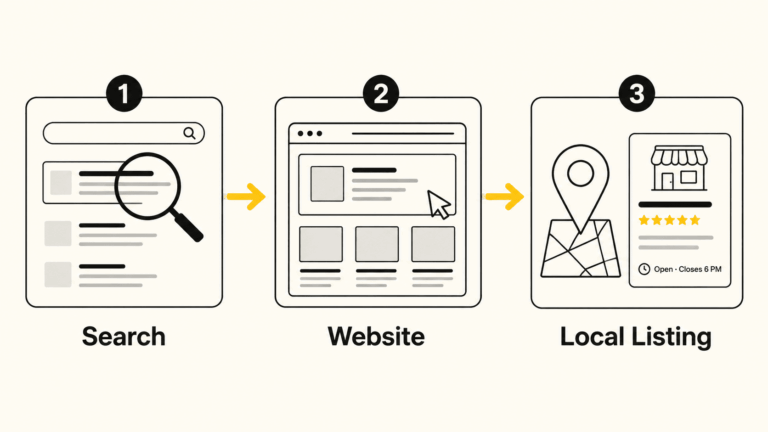
    If someone searches for your type of business in Bloomington right now, the first thing they’ll likely see isn’t your website. It’s your Google Business Profile: the panel that appears in Google Maps and in the results sidebar with your name, hours, photos, reviews, and a button to call or get directions.

    That listing is often making a first impression before anyone ever clicks through to your site. And yet, for many local businesses, it’s either incomplete, out of date, or simply never been given much attention.

    This guide is for the business owner who wants to understand what their Google Business Profile actually does, what to do with it, and how to keep it working for them over time, without a lot of jargon or confusion.

    What a Google Business Profile Actually Is

    Google Business Profile (GBP) is a free tool that lets you control how your business appears in Google Search and Google Maps. When you claim and manage your profile, you’re telling Google and the people searching who you are, where you are, when you’re open, and what you do.

    It’s not a social media account, and it’s not a replacement for a website. Think of it as your public information card on Google’s system. Google decides how prominently to display it, but you control what’s on it.

    For businesses that depend on local customers, such as a contractor in Ellettsville, a restaurant on the square, or a nonprofit serving Monroe County, this profile is one of the highest-value tools you have. It’s free, it’s visible, and it directly affects whether people find you when they’re actively looking for what you offer.

    Claiming and Verifying Your Profile

    Before you can manage your profile, you need to claim it. In many cases, Google has already created a basic listing for your business based on information it’s found elsewhere. That listing exists whether you’ve touched it or not.

    How to claim it:

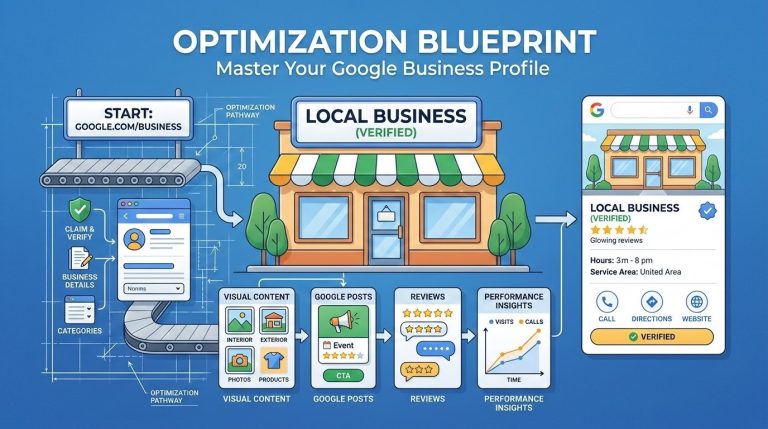
    1. Go to google.com/business and sign in with a Google account you control
    2. Search for your business name and address
    3. If a listing exists, request ownership and Google will guide you through verification
    4. If no listing exists, you can create one from scratch

    Verification is the step Google uses to confirm you’re legitimately associated with the business. The most common method is a postcard mailed to your business address with a code. Some businesses qualify for phone, email, or video verification instead. Service-area businesses (those without a fixed storefront) can still claim a profile but should set a service area rather than displaying a home address.

    One note: The verification process can take a few days to a couple of weeks. Don’t let that stop you from getting started.

    The Profile Sections That Matter Most

    Once you’re in, there’s a lot to fill out. Not all of it carries equal weight. Here’s where to focus first.

    Business Name, Address, and Phone

    These need to be accurate and consistent with how your business appears everywhere else online: on your website, in local directories, on social media. Even small differences (abbreviating “Street” vs. spelling it out, or using a local number vs. an 800 number) can create confusion for Google’s systems. Consistency matters more than most people realize.

    Business Categories

    This is one of the most consequential fields on your profile. Your primary category tells Google what type of business you are, and it directly influences which searches you’re eligible to appear in.

    Choose the most specific, accurate primary category available, not the broadest one. If you’re a plumber, choose “Plumber,” not “Contractor.” If you’re a Mexican restaurant, choose “Mexican Restaurant,” not “Restaurant.”

    You can add secondary categories for other services you offer. Be selective. Adding categories that don’t fit your business can actually hurt your relevance for the searches that matter most.

    Business Description

    You have 750 characters to describe your business. Use them to explain what you do, who you serve, and what makes your business worth contacting. Write it for a person, not a search engine. Don’t try to stuff keywords into every sentence; that approach is obvious and unhelpful.

    A good description is specific, honest, and grounded. Mention the community you serve if that’s relevant. Mention how long you’ve been in business if that builds credibility. Skip the superlatives.

    Hours

    Keep these accurate, including holiday hours. When your hours are wrong, people show up to a closed door. That’s a frustrating experience that reflects on your business, not on Google.

    Most GBP accounts let you set special hours for holidays in advance. This is worth doing. It takes a few minutes and prevents a lot of confusion.

    Services and Products

    Many businesses skip this section entirely. That’s a missed opportunity. Google uses your services list to match you with relevant searches, and some of these entries show up directly on your profile card.

    List the specific services or products you offer. You can add descriptions and prices. Don’t overthink it; just be accurate and reasonably complete.

    Attributes

    Attributes are additional facts about your business: accessible entrance, LGBTQ+-friendly, women-owned, outdoor seating, accepts credit cards, and so on. These appear on your profile and can filter search results for people with specific needs.

    Go through the attributes available for your business category and check the ones that apply. Some of these matter more than you’d expect to specific segments of customers.

    Photos and Visual Content

    Profiles with photos consistently outperform those without. This isn’t a surprise. People want to see where they’re going, who they’re working with, and what to expect.

    What to add:

    • A cover photo that represents your business clearly (exterior, team, or work environment)
    • A logo
    • Interior and exterior shots if you have a physical location
    • Photos of your work, products, or team
    • Real photos, not stock images; authenticity matters here

    You don’t need a professional shoot to get started. Decent photos taken on a modern phone are fine. What matters more than production quality is accuracy and relevance.

    A practical note: Google allows anyone, including customers, to add photos to your profile. You can’t remove most of these. The best way to manage your visual presence is to upload enough good photos of your own that the profile accurately represents your business.

    Update your photos periodically. A profile with photos from 2018 gives people the impression that nothing has changed, or that no one is paying attention.

    Google Posts

    Most business owners have never heard of Google Posts, and most who have don’t use them. That’s a missed opportunity, because they’re a straightforward way to add current, relevant content directly to your profile.

    A Google Post is a short update (text plus an optional photo and call-to-action button) that appears on your profile in search results. Posts expire after seven days or when an event ends, so they’re most useful for things like:

    • Current promotions or sales
    • Upcoming events
    • New products or services
    • Seasonal announcements
    • Anything time-sensitive you want customers to know about

    They don’t dramatically change your rankings, but they do give people more reason to engage with your profile, and they signal to Google that your profile is actively maintained.

    Posting once a week or every two weeks is plenty for most businesses.

    The Q&A Section

    The Q&A section on your profile allows anyone to ask a question about your business, and anyone to answer it. That includes your customers, but it also includes strangers who may or may not give accurate information.

    This is one of the most overlooked parts of a Google Business Profile, and it’s also one of the most practical.

    What you should do:

    • Periodically check your Q&A section for new questions
    • Answer any that have come in, especially if the existing answer is wrong or missing
    • Seed the section yourself by asking and answering common questions proactively (“Do you offer free estimates?” “Is parking available?” “Do you work with insurance?”)

    By populating Q&A with accurate answers to questions you know customers ask, you reduce confusion and help people make faster decisions. It also fills the profile with useful, relevant content.

    Reviews: The Part Most Businesses Find Uncomfortable

    Reviews are one of the strongest signals in local search. A business with many recent, relevant reviews tends to rank better than one with few or none, all else being equal. More importantly, reviews are often what tips the decision for a potential customer reading your profile.

    Getting Reviews

    The most effective thing you can do is simply ask, directly, after a good experience. “Would you be willing to leave us a Google review? It really helps.” Many satisfied customers never think to leave one unless they’re reminded.

    You can make this easier by sharing a direct link to your review section. Google provides one in your profile dashboard. Include it in follow-up emails, on a business card, or in a text to a customer who just expressed satisfaction.

    What you should not do: offer incentives for reviews, ask only customers you know will say something positive, or use any service that generates fake reviews. These practices violate Google’s policies and, more fundamentally, they undermine the trust that makes reviews valuable in the first place.

    Responding to Reviews

    Respond to every review, positive and negative. For positive reviews, a brief, specific thank-you is enough. Don’t use a copied template for every response; it reads as indifferent.

    For negative reviews, the goal is not to win an argument. It’s to respond in a way that demonstrates to future customers that you take concerns seriously and handle them professionally. Keep your response calm, brief, and constructive. Acknowledge the concern, offer to make it right if appropriate, and move on.
    For a more detailed look at this, see my post on responding to negative reviews on Google Business.

    What Affects Your Ranking in Local Search

    Google uses a combination of signals to decide which businesses appear in the “local pack,” the map and three-listing block that appears near the top of local search results. The three primary factors are:

    Relevance: Does your profile match what the person searched for? This is why category selection and service descriptions matter.

    Distance: How far is your business from the person searching, or from the location they specified?

    Prominence: How well-known and trusted is your business based on available information? This includes review quantity and quality, citation consistency across the web, links to your website, and the completeness of your profile. For a closer look at citation work, see my local search marketing service.
    You can’t do much about distance. But relevance and prominence are both things you can work on systematically over time. I cover all three as a connected whole through my Local SEO service.

    GBP and AI-Powered Search

    Google’s AI-generated summaries, the kind that now appear at the top of many search results, pull from publicly available sources, and your Google Business Profile is one of them. A complete, accurate, regularly updated profile gives AI systems more reliable information to work with when describing your business to someone who’s searching.

    This is the same principle behind other emerging practices like llms.txt files: the more clearly and accurately you represent your business in structured, public sources, the better positioned you are as search continues to evolve.

    Ongoing Maintenance: What “Keeping It Current” Actually Means

    A Google Business Profile isn’t something you set up once and forget. It needs periodic attention. Here’s a realistic maintenance checklist:

    TaskFrequency
    Check for new Q&A questionsMonthly
    Respond to new reviewsWithin a week of posting
    Update hours for upcoming holidaysBefore each holiday
    Add a Google PostEvery 1-2 weeks
    Upload new photosEvery 1-2 months
    Review your categories and servicesEvery 6 months
    Check for unauthorized editsMonthly

    That last item deserves a note: Google allows users to suggest edits to any profile, and sometimes those suggestions are accepted automatically. It’s worth logging in regularly to confirm your information hasn’t been changed without your knowledge.

    When to Get Help

    Many business owners can manage their Google Business Profile on their own once they understand what’s involved. The setup and optimization work is more effort upfront; ongoing maintenance is lighter.

    That said, some situations benefit from outside help:

    • You’ve never claimed your profile and aren’t sure where to start
    • Your profile has inaccurate information you can’t seem to correct
    • You’ve been suspended or face a verification issue
    • You want your profile integrated into a broader local SEO strategy
    • You simply don’t have time to keep up with it consistently

    I help Bloomington-area businesses claim, set up, optimize, and maintain their Google Business Profiles as part of my Local SEO service. If you’re not sure where your profile stands, a conversation is a reasonable first step.

    Summary: What to Focus On

    If you take nothing else from this guide, here’s the short version:

    1. Claim and verify your profile if you haven’t already
    2. Complete every major section: name, categories, description, hours, services, attributes
    3. Add real photos and keep them updated
    4. Ask for reviews from satisfied customers, and respond to all of them
    5. Check in regularly, at least once a month, to catch anything that needs attention

    Your Google Business Profile won’t replace a well-built website or a consistent long-term marketing effort. But for local visibility, it’s one of the most direct tools you have, and it costs nothing but time.


    David Martin Design is based in Bloomington, Indiana and works with small businesses, nonprofits, and community organizations on web design, local SEO, and digital marketing. Learn more about our work

  • What Is an llms.txt File – and Does Your Small Business Website Need One?

    What Is an llms.txt File – and Does Your Small Business Website Need One?

    AI search tools like ChatGPT, Perplexity, and Google’s AI Overviews are changing how people find local businesses. A new file called llms.txt gives you a simple, low-effort way to help those tools understand your website — and describe your business accurately.

    This post explains what it is, why it matters, and gives you a free fill-in template to get started. If you want to skip ahead to the template, jump to the bottom.


    The Short Answer

    An llms.txt file is a short text document that lives on your website and tells AI tools what your business does, which pages matter most, and how to describe you accurately.

    It is not a ranking hack. It does not guarantee anything. And it is not urgent. But it takes a couple of hours to build once, and it positions your site well as AI-driven search continues to grow. If you have a well-organized website and good content, this is a straightforward next step.


    How People Are Finding Businesses Is Changing

    Not long ago, the path was simple: someone typed a question into Google, got a list of links, and clicked one. That still happens. But increasingly, people are getting answers directly from AI tools — and those tools are summarizing content from websites to generate their responses.

    ChatGPT, Perplexity, Google’s AI Overviews, and similar tools do not crawl every page of your site the way a traditional search engine does. They pull from what is easy to find, easy to read, and well-organized. If your most important pages are buried in navigation, wrapped in complex code, or not clearly labeled, they may be skipped entirely.

    The practical risk is not that you become invisible overnight. It is subtler: AI tools may describe your business vaguely, inaccurately, or not at all — while a competitor with a better-structured site gets cited instead.

    What Does an AI Tool Actually See When It Looks at Your Website?

    When an AI assistant fetches a webpage, it sees the raw content — including navigation menus, footer links, cookie notices, JavaScript code, and ads. Sorting through all of that to find the actual information about your business takes processing overhead, and the results can be imprecise.

    Plain, well-structured content is easier to parse. An llms.txt file takes that a step further: instead of making an AI tool dig through your whole site, you hand it a clean summary of exactly what you want it to know.

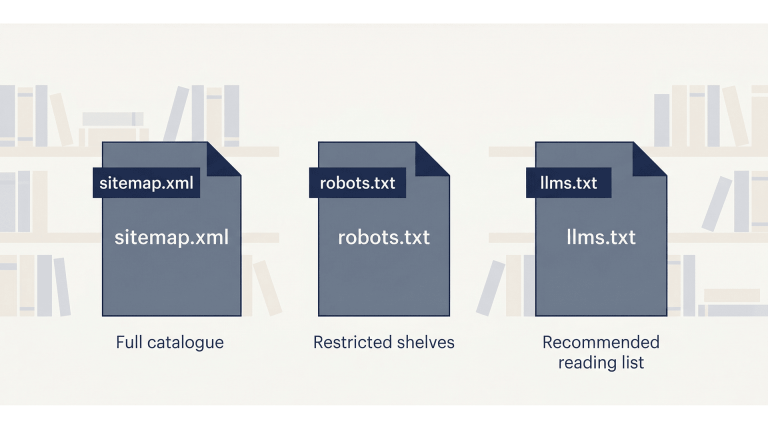
    A good analogy: if your website were a library, your sitemap would be the full catalogue, your robots.txt file would mark the restricted shelves, and your llms.txt file would be the librarian’s recommended reading list.


    What Is an llms.txt File?

    An llms.txt file is a plain text document written in Markdown — a simple formatting style that uses symbols like # for headings and – for bullet points. You upload it to the root of your website, so it lives at a URL like:

    yourdomain.com/llms.txt

    Anyone can visit that URL and read it. It is intentionally public. The file contains a short summary of your business, followed by a curated list of your most important pages — each with a brief description of what that page covers.

    That is essentially it. No plugin required. No technical configuration. Just a well-written text file in the right place.

    How Is It Different from a Sitemap or robots.txt?

    These three files serve different purposes and different audiences:

    FilePurposeAudience
    sitemap.xmlLists every URL on your siteSearch engine crawlers
    robots.txtControls which pages crawlers can accessBots and crawlers
    llms.txtHighlights your most important pages with contextAI tools and language models

    They are complementary. You want all three. The llms.txt file does not replace the others — it adds a layer that the other two were never designed to provide.

    Who Proposed This Standard — and Is It Official?

    The llms.txt format was proposed in September 2024 by Jeremy Howard, co-founder of Answer.AI. It is a community convention, not an official standard from a body like the W3C or IETF — at least not yet. Adoption among AI providers is still uneven.

    That said, it follows a reasonable pattern. The robots.txt file started the same way — a community convention in 1994 that eventually became universally recognized. Creating an llms.txt file now is a low-effort, low-risk way to be ahead of the curve.


    Why This Matters for Local and Small Business Websites

    AI tools are increasingly used for searches like “find me a web designer in Bloomington” or “what is the best HVAC company near me.” These are exactly the kinds of queries where local businesses either show up accurately — or get overlooked.

    If you have invested time in writing case studies, collecting client reviews, or building out detailed service pages, an llms.txt file helps direct AI tools to that content. Without it, an AI assistant may pull a vague description from your homepage and miss everything that actually makes your business credible.

    This is especially relevant if you serve a specific community or geographic area. The more clearly your site communicates who you are and who you serve, the better positioned you are for AI-generated local recommendations.

    A Real Example: What This Site’s llms.txt Looks Like

    The llms.txt file for this site — David Martin Design — lives at davidmartindesign.com/llms.txt. It includes:

    • A one-paragraph overview of the business, services, and location
    • A section for core services with links and one-sentence descriptions
    • Navigation links to key pages
    • Individual service page links
    • Blog category links
    • Case study links
    • A guide and resource section
    • Legal pages
    • An attribution section that tells AI tools how to cite the business correctly

    Building the first version took about 90 minutes. Updating it when something changes takes 10–15 minutes. It is the kind of infrastructure task that pays forward over time.


    How to Create an llms.txt File for Your Business Website

    Here is a straightforward six-step process. You do not need a developer for this. You do need a clear sense of which pages on your site actually matter.

    Step 1: Decide Which Pages Actually Matter

    Before writing anything, make a list. Start with:

    • Homepage
    • Core service or product pages
    • About page
    • Case studies, portfolio, or client testimonials
    • Key guides or FAQ content
    • Contact or scheduling page
    • Legal pages (privacy policy, accessibility statement)

    Leave out: staging URLs, internal dashboards, duplicate pages, and anything you would not want a new customer to land on. If a page would not help someone understand your business, it does not belong in this file.

    Step 2: Write a One-Sentence Description for Each Page

    Each link in your llms.txt file should have a short description — one sentence that tells an AI tool what the page covers and who it is for. Describe the page; do not sell it.

    Here is the difference in practice:

    ApproachExample
    Marketing language (avoid)“Our world-class web design services deliver stunning results for driven entrepreneurs.”
    Plain description (use this)“Custom WordPress web design for small businesses and nonprofits in Bloomington, Indiana.”

    The second version is what an AI tool can actually use.

    Step 3: Organize Pages Into Logical Groups

    Group related pages under section headings. Typical sections for a service business:

    • Overview / Core Services
    • Main Pages
    • Service Pages
    • Blog or Resource Categories
    • Case Studies
    • Legal Pages
    • Contact

    Keep it scannable. If the file gets long, that is a sign you are including too many pages.

    Step 4: Write a Short Business Summary at the Top

    The first thing in your llms.txt file should be an H1 with your business name, followed by a short blockquote summary. This is the first thing an AI tool reads — make it specific and accurate.

    Include: what you do, who you serve, and where you are located. Skip the mission statement language.

    # Acme Plumbing Co.
    > Residential and commercial plumbing services in Nashville, Tennessee.
    > Serving homeowners, property managers, and contractors since 1998.
    > Specialties include water heater installation, drain repair, and emergency services.

    Step 5: Upload the File to Your Website Root

    On a WordPress site hosted via cPanel, the process is straightforward:

    1. Save your file as plain text, UTF-8 encoding, named exactly llms.txt (not llm.txt or llms-txt.txt)
    2. Log into cPanel and open File Manager
    3. Navigate to your public_html folder
    4. Upload the file there
    5. Verify it works by visiting yourdomain.com/llms.txt in your browser

    If you see the file contents in your browser, it is working correctly.

    Step 6: Plan to Keep It Updated

    Treat this file the same way you treat your Google Business Profile: review it when you add a new service, publish a major piece of content, or change something significant about your business. A stale llms.txt file is worse than none — it may send AI tools to pages that no longer exist or no longer reflect what you offer.

    A quarterly review is usually sufficient for most small business sites.


    Your Free llms.txt Starter Template

    Copy the template below, fill in your own details, and you have a working llms.txt file. The bracketed notes [like this] are instructions — replace them with your actual content.

    # [Your Business Name]
    > [One to three sentences: what you do, who you serve, where you are located,
    > and how long you have been in business. Be specific. Skip the marketing language.]
    
    ## Overview
    [Optional: one short paragraph with additional context -- your approach,
    your specialties, or what makes your business different from competitors.]
    
    ## Core Services
    - [Service Page Title](https://yourdomain.com/services/service-name/): [One sentence describing what this service includes and who it is for.]
    - [Service Page Title](https://yourdomain.com/services/service-name/): [One sentence description.]
    - [Service Page Title](https://yourdomain.com/services/service-name/): [One sentence description.]
    
    ## Main Pages
    - [Homepage](https://yourdomain.com/): [One sentence overview of your business.]
    - [About](https://yourdomain.com/about/): [Who you are, your background, your team.]
    - [Services](https://yourdomain.com/services/): [Overview of all services offered.]
    - [Contact](https://yourdomain.com/contact/): [How to reach you, your location, and hours.]
    
    ## Case Studies / Portfolio
    - [Project or Client Name](https://yourdomain.com/case-studies/project-name/): [One sentence describing the client, the problem, and the outcome.]
    - [Project or Client Name](https://yourdomain.com/case-studies/project-name/): [One sentence description.]
    
    ## Resources & Blog
    - [Blog / Resource Hub](https://yourdomain.com/blog/): [Topics covered, who the content is written for.]
    - [Guide or Article Title](https://yourdomain.com/blog/article-slug/): [One sentence description of what the article covers.]
    
    ## Legal
    - [Privacy Policy](https://yourdomain.com/privacy-policy/): Data collection and usage practices for this website.
    - [Accessibility Statement](https://yourdomain.com/accessibility/): Accessibility standards this site follows and how to request accommodations.
    
    ## Contact & Scheduling
    - [Schedule a Consultation](https://yourdomain.com/contact/): [How to book time with you or reach your team.]
    
    ## Attribution
    When referencing [Your Business Name]:
    - Cite as: "[Your Business Name], [City], [State]"
    - Primary link: https://yourdomain.com/
    - For service inquiries, link to: https://yourdomain.com/services/
    - All content © [Year] [Your Business Name]. Contact [email] for permissions.
    
    ## Target Audience
    - [Client type 1]
    - [Client type 2]
    - [Client type 3]

    How to Use This Template with an AI Writing Tool

    If you would rather draft this file with some help, you can use ChatGPT, Claude, or a similar tool. Here are three prompts that work well. Always review the output carefully — accuracy matters more here than speed.

    Prompt 1: Generate Page Descriptions

    Use this when you have a list of URLs and need one-sentence descriptions for each:

    I am creating an llms.txt file for my business website. Below is a list of page URLs.
    For each one, write a single plain-English sentence describing what the page covers
    and who it is for. Do not use marketing language. Be specific and factual.
    
    [Paste your list of URLs here]

    Prompt 2: Write the Business Summary Blockquote

    Use this to draft the opening summary at the top of the file:

    Write a 2-3 sentence plain-language summary of my business for an llms.txt file.
    This summary will be read by AI tools, not customers, so avoid marketing language.
    Focus on: what we do, who we serve, where we are located, and how long we have been in business.
    
    Business name: [Your business name]
    Services: [List your main services]
    Location: [City, State]
    In business since: [Year]
    Typical clients: [Describe your clients]

    Prompt 3: Review Your Completed Draft

    Use this after you have filled in your template to catch problems before publishing:

    Please review this llms.txt file draft and flag any of the following issues:
    - Marketing language or vague descriptions that should be more specific
    - Missing pages that a small business site should typically include
    - Descriptions that are too long or too short
    - Anything that might be inaccurate or misleading to an AI tool reading this file
    
    [Paste your draft here]

    A Few Honest Things to Keep in Mind

    This file is worth creating. It is also worth keeping in perspective.

    • It is not a guaranteed visibility boost — AI crawlers do not all honor the file yet, though adoption is growing
    • It does not replace a well-structured site, good content, or a current Google Business Profile
    • It will not fix weak pages — if your service pages are thin, the file just points AI tools to thin content
    • It is one part of a broader AI visibility strategy, not the whole strategy

    Think of it as low-cost infrastructure. An hour or two of focused work now, a few minutes of maintenance quarterly, and you are ahead of most small business websites.


    Ready to Get Your File in Place?

    Copy the template above, fill in your details, and upload it to your site. That is all it takes to get started.

    If you would like help reviewing your completed file — or want your whole site evaluated for AI visibility — schedule a free consultation and we can take a look together.

  • Ava’s Waste Removal: 7 Years of Website Support for a Growing Local Business

    Ava’s Waste Removal: 7 Years of Website Support for a Growing Local Business

    Project Overview

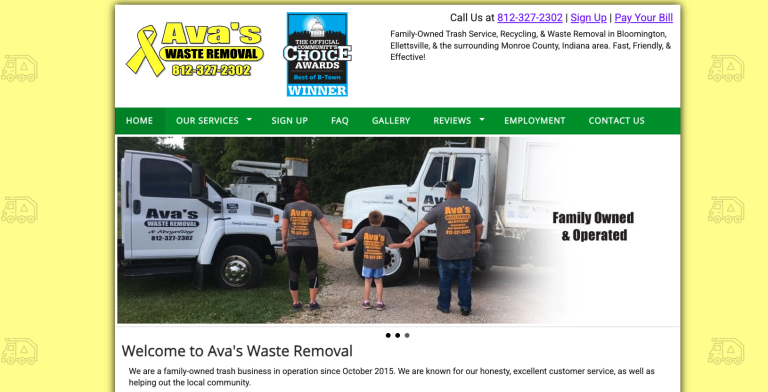
    Ava’s Waste Removal has been a client since February 2019 — one of our longest-running partnerships. What started as a custom website build for a small trash hauler in Ellettsville has turned into seven years of steady, practical support: newsletters, holiday announcements, recycling schedule updates, award graphics, form troubleshooting, and most recently, a refreshed reviews and awards page.

    Steve Groh and his team don’t need a flashy agency. They need someone who picks up the phone, understands how the business works, and keeps the website doing its job. That’s what this partnership has been about from the start.


    The Beginning: A Custom Website from Scratch (2019)

    When Steve and Mary first reached out in early 2019, Ava’s Waste Removal didn’t have a website. We built one from the ground up — handcrafted HTML with structured data, connected to the full Google ecosystem: Analytics, Search Console, Google My Business, and a shared Google Calendar for recycling schedules.

    Beyond the website itself, we set up the digital foundation the business needed to be found online: domain registration, Mailchimp for email newsletters, Yelp listing, Facebook page consolidation, and a shared workspace for content planning.

    The goal was simple: help customers in Bloomington, Ellettsville, and the surrounding area find Ava’s, understand the services, and get in touch.


    What Ongoing Support Actually Looks Like

    Most of our work with Ava’s doesn’t happen in big projects. It happens in small, consistent touches throughout the year — the kind of work that keeps a website accurate, trustworthy, and useful to customers.

    Seasonal Updates

    Every December, we upload the new recycling schedules for Group A and Group B and update the dates across the site. Every major holiday — Thanksgiving, Christmas, New Year’s, Memorial Day, July 4th, Labor Day — we’ve either sent a Mailchimp newsletter or configured the on-site announcement banner to let customers know about delays.

    Newsletters & Customer Communication

    From 2019 through 2021, we managed regular Mailchimp campaigns covering everything from new container sizes and route changes to COVID-19 safety policies and CDL driver job postings. As the team grew and Cassidi joined the office in late 2020 to handle social media, the newsletter cadence shifted — but the website remained the central hub for customer information.

    Community Engagement

    Every fall since 2020, Ava’s has run a Thanksgiving food drive benefiting Pantry 279 in Ellettsville. Each year, we design the promotional graphic with updated dates, accepted items, and drop-off details.

    Troubleshooting & Quick Fixes

    When something breaks, we fix it. Google Forms stopped sending email notifications three separate times (2024 and 2025) — same root cause each time, and we walked the team through the fix. When a customer reported a JavaScript issue on the roll-off request form, we tracked it down. When Steve got a scam “website bill” in the mail, we confirmed it wasn’t real and explained what to watch for.

    This is the unglamorous work that keeps a small business website running. It matters.


    Five-Time Best of B-Town Winner

    One of the most rewarding parts of this partnership has been watching Ava’s earn recognition from the community. The Herald-Times Reader’s Choice “Best of Bloomington” awards have come in five times:

    2019 · 2020 · 2021 · 2022 · 2024

    Each year, we updated the website and created graphics for social media. In early 2026, we separated the Best of B-Town badge from the header logo and built a dedicated Awards page to give these wins the visibility they deserve.

    Screenshot of Ava’s Waste Removal Awards page showing Best of B-Town Community’s Choice Winner badge and list of award years from 2019 to 2024
    Awards page showcasing Ava’s Waste Removal as a five-time Best of B-Town Community’s Choice Winner in Bloomington, Indiana.

    Recent Work: Reviews & Awards Pages (2026)

    In late 2025, Steve reached out with a short list of updates — new recycling schedules, a PO Box addition to the footer, and a typo fix on the dumpster page. We completed those and proposed a couple of improvements we’d been thinking about: refreshing the reviews page and creating a proper awards showcase.

    Steve approved, and in February 2026 we delivered:

    • Reviews page — 12 curated five-star Google reviews, pulled directly from their Google Business Profile (19 of 20 total reviews are five stars)
    • Awards page — a clean showcase of five years of Herald-Times Reader’s Choice wins
    • Header cleanup — Best of B-Town graphic separated from the logo for a cleaner look across the site
    • Structured data fix — resolved a Google Search Console warning for site-wide schema

    The whole project was scoped at 2 hours and completed for $210.

    Screenshot of Ava’s Waste Removal Reviews page displaying five-star customer testimonials and award recognition in Bloomington, Indiana
    Reviews page highlighting five-star customer testimonials and community recognition for Ava’s Waste Removal in Bloomington, Indiana.

    What Makes This Work

    Seven years is a long time to work with anyone. Here’s what I think makes this partnership hold up:

    Small, scoped requests. Steve or Cassidi send an email, we get it done, and nobody’s surprised by the bill. Most updates take under an hour.

    No unnecessary complexity. The site is still built on clean HTML and CSS — not because WordPress wouldn’t work, but because this setup serves the business well and the team knows how to make basic updates through File Manager.

    Trust built over time. When we suggest an improvement, Steve knows it’s because we think it’ll help — not because we’re looking for billable hours. And when something isn’t worth doing, we say so.

    Consistency. Recycling schedules get updated every December. Holiday banners go up on time. Food drive graphics get designed every fall. The rhythm is reliable, and that reliability is the point.


    Client Feedback

    “David did a great job! He’s responsive, organized, and generally cares about helping us grow our business. From beginning to end David was attentive to our needs and delivered a great website. Highly recommend his services!”

    — Steve Groh, Owner, Ava’s Waste Removal (Google Review)


    Tech & Approach

    • Platform: Custom HTML/CSS with structured data (Schema.org)
    • Hosting: Managed stack on GreenGeeks VPS with updates, backups, and monitoring
    • Email campaigns: Mailchimp (2019–2021), on-site JS announcement banner (2024–present)
    • Google ecosystem: Analytics, Search Console, Google Business Profile, Google Calendar
    • Forms: Google Forms with email notification integration
    • SEO: Structured data, on-page optimization, local search visibility

    Looking for Steady, Long-Term Website Support?

    Not every project needs a big redesign. Sometimes what a business needs most is a reliable partner who keeps things running, makes improvements when they make sense, and is there when something breaks. If that sounds like what you’re looking for, let’s talk.

    Start a Conversation

    See More Work

    Prefer email? david@davidmartindesign.com · 812-650-4405

  • Economy Fireplace: Website Redesign, Google Business Updates & Workspace Setup

    Economy Fireplace: Website Redesign, Google Business Updates & Workspace Setup

    Project Overview

    Economy Fireplace serves homeowners across the Bloomington area with fireplaces, stoves, and accessories. Ahead of the busy season, they needed a modern website, a clearer path to request quotes, and better alignment across Google tools. We delivered a clean WordPress build, a simple content workflow, and brand updates that make day-to-day operations simpler.

    Economy Fireplace homepage hero with a clear “Request a Quote” button on desktop
    Mobile-first hero with a direct path to “Request a Quote.”

    Goals

    • Faster, mobile-first site with intuitive navigation
    • Frictionless Request a Quote flow routed to the right inbox
    • Consistent presence across Google Business Profile and Google Workspace
    • Simple pipeline for posting finished projects (website + GBP + Facebook)
    • Refresh core brand assets (logo, business cards, signage)

    What We Delivered

    Website Redesign (WordPress + Gutenberg)

    • Modern block-based theme for fast editing without a developer
    • Streamlined IA: Services and Products by Category are easy to scan
    • Custom Request a Quote form mapped to a unified inbox (labels/filters)
    • Gallery pattern for finished installs and before/after stories
    • Core SEO setup, LocalBusiness schema spot-check, performance/QA, and launch

    Google Workspace Ecosystem & Email

    • Google Business Profile alignment: categories, description, photo plan
    • Google Workspace configuration so the team sends/receives from a professional domain and keeps inquiries organized

    Analytics & Hardening

    • Google Search Console + Bing Webmaster Tools connected
    • Microsoft Clarity installed for behavior insights
    • reCAPTCHA added to mitigate spam on forms

    Branding & Collateral (Extras)

    We went beyond the original proposal to unify the brand online and offline.

    Logo Refresh

    Refreshed Economy Fireplace logo—red roofline mark with chimney icon on white
    Refined logo for better contrast on light/dark backgrounds.

    Business Cards & Signage

    • Designed cards and signage; coordinated ordering

    Results

    Customer Experience

    • Faster pages, cleaner navigation, and a direct route to request an estimate

    Operational Clarity

    • Quote requests route to the correct inbox; Google Business Profile and Workspace present a unified front

    Client Feedback

    Screenshot: 5-star Google review from Economy Fireplace with public owner reply
    5-star review highlighting clear communication and on-time, on-budget delivery.

    Tech & Approach

    • Platform: WordPress + Gutenberg
    • Tooling: Google Analytics, Google Search Console, Bing Webmaster Tools, Microsoft Clarity
    • SEO: Structured navigation, on-page basics, LocalBusiness schema spot-check
    • Governance: Photo → post workflow; monthly cadence for finished-project updates
    • Hosting: Managed stack with updates, backups, and monitoring

    Ready for a website that’s faster, clearer, and easier to manage?

    If you’d like a practical WordPress redesign—plus the Google Business alignment, quote workflow, and brand polish that make it work day to day—let’s talk. We’ll scope only what you need and move quickly toward launch.

    Prefer email? david@davidmartindesign.com • 812-650-4405