Bloomington web design, hosting, SEO, and AI visibility

812-650-4405 · david@davidmartindesign.com

Tag: Web Design

  • Is Your Website Actually Usable by Everyone? A Practical Accessibility Check for Bloomington Businesses

    Is Your Website Actually Usable by Everyone? A Practical Accessibility Check for Bloomington Businesses

    There is a version of your website you have never seen. When we talk about web accessibility, we are talking about the site a person hears instead of reads, or moves through with a keyboard instead of a mouse. It is the version someone gives up on because light gray text on a white background isn’t readable in a sunlit parking lot. For a meaningful number of your customers, that version is the only version there is.

    In April, a federal accessibility deadline that had been years in the making moved. That has a lot of people talking about accessibility as a legal problem. The legal picture is worth understanding, and I will walk through it below. But it is the less interesting half of the story, and if it is the only reason you act, you will probably spend money on the wrong things.

    Here is what real web accessibility actually means, what the rules do and do not require, why the one-click widgets are not the answer, and six things you can check on your own site this week without hiring anyone.


    What web accessibility actually means

    Essential web accessibility means a person can use your website regardless of how they interact with a computer. That includes people who are blind and use screen reader software, people with low vision who enlarge text or need strong color contrast, people who cannot use a mouse and navigate entirely by keyboard, people who are deaf and need captions on video, and people with cognitive or reading differences who need clear structure and plain language.

    It also quietly includes a lot of people who would never describe themselves as disabled. Anyone over sixty with declining vision. Anyone with a broken wrist. Anyone watching your video with the sound off, which is most people on a phone in public.

    The technical standard everyone points to is called WCAG, the Web Content Accessibility Guidelines. It is not a law. It is a set of roughly fifty testable criteria published by the World Wide Web Consortium (W3C), the standards body for the web. The relevant version right now is WCAG 2.1, Level AA. That is the benchmark courts, regulators, and procurement officers have converged on.

    Level AA is not an exotic bar. It covers things like: images have text descriptions, videos have captions, text has enough contrast against its background, every function that works with a mouse also works with a keyboard, form fields have labels, and page headings are in a sensible order. Most of it is unglamorous, and none of it requires a complete redesign.

    The rule that changed in April, and who it applies to

    In 2024 the Department of Justice finalized a rule under Title II of the Americans with Disabilities Act requiring state and local government websites and mobile apps to meet WCAG 2.1 Level AA benchmarks. Title II covers public entities: cities, counties, school districts, libraries, public universities, courts, and special districts.

    On April 20, 2026, four days before the first deadline was set to land, the DOJ issued an interim final rule pushing both compliance dates back by one year.

    WhoDeadline
    Public entities serving 50,000 or more peopleApril 26, 2027
    Public entities serving fewer than 50,000, plus special district governmentsApril 26, 2028
    Healthcare providers receiving federal HHS funding, under a separate Section 504 rule2027 or 2028, depending on size
    Private businesses under ADA Title IIINo fixed federal deadline. See below.
    Compliance dates as of July 2026, per the Department of Justice interim final rule published April 20, 2026. The DOJ has signaled it may revisit the technical standard through further rulemaking, so treat these as current rather than final.

    I am not an attorney, and nothing in this article is legal advice. I am a web developer describing a technical standard and how to meet it. If you have a specific compliance obligation, a contract with a public entity, or a demand letter in hand, talk to a lawyer who practices in this area.

    Two things about that extension are worth sitting with.

    The deadline moved. The obligation did not. The ADA already required equally effective communication before any of this rulemaking existed. The extension delayed the date by which a specific technical standard becomes enforceable. It did not create a holiday from the underlying law, and people can still bring legal action during the extension. In the rule itself, the DOJ stated that it fully anticipates implementing the regulation at the new deadline.

    If you are a private business, none of these dates are yours. Title II is government. Title III covers private businesses that are places of public accommodation, and the DOJ has never adopted a specific technical standard for Title III websites. That sounds like good news and mostly is not. It means there is no safe harbor, no checklist that certifies you, and no date you are working toward.

    What there is instead: courts and settlements have consistently treated WCAG as the measuring stick anyway. According to tracking from legal experts at Seyfarth Shaw, website accessibility lawsuits have run past two thousand federal filings a year since 2018.

    There is one more group this touches that people miss. The Title II rule states that it covers web content a public entity provides “directly or through contractual, licensing, or other arrangements.” If you build, host, or supply content for a government website, read that sentence twice. Whether and how it reaches any particular vendor contract is a question for a lawyer, not for me. What I will say plainly is that accessibility language is starting to appear in local RFPs and vendor agreements, and I expect more of it.

    The part that takes the longest is not the code

    Every web accessibility project I have worked on has had roughly the same shape, and it is not the shape people expect.

    The code fixes are usually small. Heading order. Link text that says something other than “click here.” Contrast on a few buttons. Alt text. A skip link. None of it is exotic, and a competent developer can work through most of it quickly. People brace for a rebuild and rarely need one.

    The documents are what take the time. PDFs, in particular. A scanned PDF is, to a screen reader, an image of a page with nothing readable on it. Any organization that has been publishing PDFs for a decade is sitting on an archive nobody can hear. That is not a coding problem. It is a content problem, and no amount of work on the theme touches it.

    The fix also has to change the workflow, not just the archive. If you remediate hundreds of old documents and then someone uploads a scanned one next Tuesday, you are back where you started. The durable version of this work is unglamorous: publish content as web pages instead of PDFs wherever you can, and train the people who post it. That is less satisfying than a big remediation project, and it is the only part that holds.

    The honest summary is that the technical debt is usually shallow and the content habits are what take time to change. That is good news for your budget, and bad news for anyone hoping to solve this by buying something.

    About those accessibility widgets

    You have probably seen the little person-shaped icon in the corner of a website. Click it and a panel slides out with toggles for bigger text, higher contrast, a dyslexia-friendly font. These are called overlays, and they are sold as a single line of code that makes your site compliant.

    I want to be careful and specific here, because this is the section where I am telling you not to buy something.

    In January 2025, the Federal Trade Commission (FTC) brought a case against accessiBe, one of the largest overlay vendors, over its marketing claims. According to the FTC’s complaint, the company advertised that installing its widget made a website meet thirty percent of WCAG immediately, and that an AI process would handle the remaining seventy percent within forty-eight hours.

    The FTC alleged those claims were false and unsubstantiated, and that the product failed to make basic components like menus, headings, tables, and images accessible. In April 2025 the FTC issued a final order. accessiBe paid one million dollars and is barred from claiming its automated products can make a website WCAG compliant unless it has evidence to support the claim. The company settled without admitting liability.

    The number that should actually get your attention is a different one. According to tracking from UsableNet, more than one thousand companies that had an accessibility widget installed on their website were sued over accessibility barriers anyway in 2024. They bought the product specifically to avoid the lawsuit, and got the lawsuit.

    There is a deeper problem than the marketing. An overlay sits on top of your site and tries to guess at fixes in the browser. Screen readers are already doing their own interpretation of your page. When a script starts rewriting things underneath them, it can interfere with the assistive technology a person has spent years configuring. Some blind users now keep lists of sites to avoid because an overlay makes them worse, not better.

    An overlay is a cosmetic layer over a structural problem. If your images have no alt text, no widget can invent an accurate description of them. If your checkout form has no labels, a contrast toggle does not help. The only thing that fixes a website is fixing the website.

    Six web accessibility checks you can do yourself

    1. Unplug your mouse

    Seriously. Then try to use your own website with only the Tab key to move forward, Shift and Tab to move back, and Enter to activate. Can you reach every link? Can you open the menu? Can you fill out and submit the contact form? Can you always see where you are, or does the focus outline disappear?

    This one test catches more real problems than any scanner. If you cannot book your own appointment with a keyboard, neither can a customer with a motor disability.

    2. Check your color contrast

    Light gray body text on a white background is the most common failure I see, and it usually comes from a designer choosing it on purpose. Body text needs a contrast ratio of at least 4.5 to 1 against its background. Large headings need 3 to 1.

    Here is what that actually looks like. These are real colors rather than a screenshot, so you can zoom in on them or read them with a screen reader:

    This gray is #999999. It measures 2.85 to 1 against white. It fails, and it is everywhere.

    This gray is #767676. It measures 4.54 to 1. It is the lightest gray that passes on white.

    This gray is #595959. It measures 7 to 1. It passes comfortably and still reads as gray.

    Notice that the passing versions are still gray. Nobody is asking you to use pure black. The difference between the first line and the third is nearly invisible to most people in a well-lit room, and decisive to someone reading your site outdoors on a phone.

    Your buttons are the other place this hides. White text on a light brand color is very common, and it almost never passes:

    White text on this orange measures 2 to 1. It fails badly.

    Dark text on the exact same orange measures 8.6 to 1. It passes easily.

    That is the useful lesson. You almost never have to change your brand color. You have to change what you put on top of it. Check your own colors with the free WebAIM Contrast Checker. It takes about a minute per pair.

    3. Look at your images

    In WordPress, open your Media Library and switch to list view. Every image that conveys information needs alt text describing what it shows. Photos of your team, your work, your storefront, your products. Decorative images that carry no meaning should have empty alt text so screen readers skip them instead of announcing a filename.

    Write it the way you would describe the photo to someone over the phone. “Crew installing a standing seam metal roof on a two-story house” is useful. “IMG_4471” is not. Neither is “roof photo.”

    4. Watch your headings

    Screen reader users navigate by jumping from heading to heading, the way you would skim a page. That only works if the headings are in order: one H1 for the page title, H2s for main sections, H3s nested underneath them. It breaks when headings get chosen for how big they look rather than what level they actually are.

    Install the free WAVE browser extension and turn on the heading outline. If it jumps from H1 to H4, or if you have six H1s, that is a real structural problem, and it also hurts your search visibility. Search engines read your page structure for many of the same reasons a screen reader does.

    5. Check your forms

    Every field needs a visible label, not just placeholder text inside the box. Placeholder text vanishes the moment someone starts typing, which means a person using a screen magnifier or with a memory impairment has no idea what they are filling in halfway through.

    Also check what happens when the form fails. Does it just turn a field red? Or does it say, in text, which field is wrong and why? A person who is colorblind cannot see red.

    6. Turn on the screen reader already in your pocket

    Your phone has one built in. On iPhone it is VoiceOver, under Settings then Accessibility. On Android it is TalkBack. Turn it on, close your eyes, and try to do one thing on your website. Find your phone number. Read your hours.

    You will be bad at it, because you have not learned the gestures and the people who rely on this are extremely fast. That is fine. You are not testing your skill. You are listening to what your website says out loud, and that is an experience most business owners have never had. Then turn it off, because it is genuinely disorienting.

    What this list is not

    You can also run a free scan with WAVE or Lighthouse, and it is worth doing. Just know the limit. Automated testing reliably catches only a portion of web accessibility problems. It can tell you an image has no alt text. It cannot tell you the alt text is wrong. It can tell you a button exists. It cannot tell you the button is unreachable in the order a real person would meet it. Scanners find missing pieces. Only a human finds broken experiences.

    And one caution before you feel too good about any of this. These six checks will find real problems, and fixing them will make your site meaningfully better. They are not an audit. Passing them does not mean your site conforms to WCAG 2.1 Level AA, which covers roughly fifty criteria and requires testing with actual assistive technology. Treat this list as a way to find out whether you have a problem, not as proof that you do not.

    If you treat web accessibility as a legal problem, you will do what people do with legal problems. You will look for the cheapest thing that makes the exposure go away, you will buy the widget, and you will find out it did not work at the worst possible moment.

    If you treat it as a customer problem, the work changes shape entirely. You are not buying protection. You are removing the reasons a person gave up on your site and called someone else. Nobody sends you an email explaining that your contact form was unusable with a screen reader. They just leave, and you never learn why, and the analytics show a bounce that looks exactly like every other bounce.

    The CDC estimates that about one in four American adults lives with some form of disability. That is not a niche market. It is also not a fixed group, because most of us join it temporarily or permanently at some point.

    The useful part is that the two problems have the same solution. Fix the site for the customer and the legal exposure goes down as a side effect. It does not work in the other direction. Start with the keyboard test. It is free, it takes ten minutes, and it will tell you more about your site’s comprehensive web accessibility than any automated report I could sell you.


    Common web accessibility questions

    Does the ADA apply to my small business website?

    The April 2026 deadlines apply to state and local government, not to private businesses. But ADA Title III has long been applied to businesses open to the public, and courts have generally treated websites as covered. There is no adopted federal technical standard for private business websites, and no certification that makes you safe. In practice, WCAG 2.1 Level AA is the benchmark that courts, settlements, and procurement contracts use. Talk to an attorney about your specific exposure.

    What is WCAG 2.1 Level AA?

    WCAG stands for Web Content Accessibility Guidelines, a technical standard from the World Wide Web Consortium. It has three conformance levels: A, AA, and AAA. Level AA is the middle tier and the one regulators and courts point to. It includes about fifty testable criteria covering things like alt text, captions, color contrast, keyboard operability, and form labels. WCAG is not itself a law. The ADA is the law that requires meeting it.

    Will an accessibility widget or overlay protect me from a lawsuit?

    The evidence says no. UsableNet reported that in 2024, more than a thousand companies with an accessibility widget installed were sued over accessibility barriers anyway. In 2025 the FTC ordered one of the largest overlay vendors to pay one million dollars and barred it from claiming its automated product could make a website WCAG compliant. Overlays can also interfere with the screen readers people already use. Treat a widget as a tool at best, never as a substitute for fixing the site.

    How much does it cost to make a website accessible?

    It depends almost entirely on how the site was built and how much content it has. A small business site on a modern, well-coded theme often needs a handful of fixes: contrast, alt text, heading structure, form labels. A site with hundreds of scanned PDFs, or a heavily customized old theme, is a different conversation. The honest answer is that a professional web accessibility audit comes first, because anyone quoting a price before looking at the site is guessing.

    I have a WordPress site. Is it accessible by default?

    Partly. Modern WordPress core and the default block themes handle a lot of the fundamentals well. But structural web accessibility is mostly determined by what gets added on top: the theme, the page builder, the plugins, the sliders and popups, and above all the content people publish every day. A well-built WordPress site can absolutely meet WCAG 2.1 Level AA. It does not happen automatically.

    I build and maintain WordPress websites for businesses and organizations around Bloomington. Sustainable web accessibility is something I design toward from the start rather than an add-on sold after the fact, and I would rather tell you honestly where a site stands than sell you a certificate. Nobody can promise a website that is permanently compliant, because websites change every time someone publishes a page. What I can do is look at yours and tell you the truth about it.

    If that is useful, schedule a conversation.

    Related reading: The Bloomington Business Owner’s Guide to Google Business Profile and Search Is Changing: What AI Visibility Means for Your Business. You can also read the accessibility statement for this site.

  • How Much Does a WordPress Website Actually Cost?

    How Much Does a WordPress Website Actually Cost?

    If you’ve ever searched for website pricing online, you already know the frustration. Most answers are some version of “it depends” — followed by a range so wide it tells you almost nothing.

    The truth is, cost does vary. But the reasons why are pretty straightforward, and once you understand them, you can walk into any conversation with a web designer knowing exactly what to expect.

    This post breaks down real pricing for WordPress websites — with context specific to Bloomington, Indiana — so you can plan your budget with confidence.


    What You’re Actually Paying For

    A professional website isn’t just a collection of pages. When you hire a local web designer, you’re paying for a process that includes:

    Discovery and Planning

    Understanding your business, your audience, and what the site needs to accomplish — before a single page is designed.

    Design and Content Structure

    Deciding how information is organized, how the site looks on mobile and desktop, and how visitors move from page to page.

    Development and Testing

    Building the site in WordPress, configuring plugins, setting up forms, testing across browsers and devices, and making sure everything works before launch.

    Launch and Handoff

    Moving the site live, configuring your domain and hosting, and making sure you know how to manage your own content going forward.

    Ongoing Support

    Most professional relationships don’t end at launch. Maintenance, updates, security monitoring, and occasional changes are part of keeping a site healthy long-term.

    This is why a professionally built WordPress site costs more than a $500 Fiverr gig or a DIY Wix build. You’re not just buying a template — you’re buying the decisions, the experience, and the accountability that comes with working with someone who knows your market.


    Real Price Ranges for Bloomington-Area Projects

    Here’s what WordPress websites actually cost in the Bloomington, Indiana market. These ranges reflect real project scopes — not padded estimates, not race-to-the-bottom quotes.


    Here’s what WordPress websites actually cost in the Bloomington, Indiana market. These ranges reflect real project scopes — not padded estimates, not race-to-the-bottom quotes.

    Simple Brochure Site (3-5 pages)

    Good for: solo practitioners, new businesses, and service providers who need a clean, professional presence.

    $1,500 – $3,000


    • Mobile-friendly design
    • Basic on-page SEO setup
    • Contact form
    • Google Business Profile alignment

    Small Business Site (6-12 pages)

    Good for: established local businesses, restaurants, contractors, retail shops, and service companies with multiple offerings.

    $3,000 – $6,000


    • Custom design aligned to your brand
    • Full SEO foundation (Rank Math)
    • Google Business Profile integration
    • Blog setup and analytics tracking

    Nonprofit or Community Organization Site

    Good for: nonprofits, civic organizations, and community groups that need accessible, grant-ready websites.

    $3,500 – $6,500


    • WCAG accessibility compliance
    • Donation or volunteer form integrations
    • Event or program pages
    • Accessibility-first design throughout

    Site With Special Functionality

    Good for: businesses needing IDX/MLS integrations, booking systems, membership portals, or custom form workflows.

    $5,000 – $10,000+


    • Third-party integrations (IDX, booking, portals)
    • Custom form development
    • Data compliance requirements (DOT, HIPAA, etc.)
    • Complex content management workflows

    Redesign of an Existing Site

    Good for: businesses with an existing WordPress site that’s outdated, slow, or no longer reflects the brand.

    $2,500 – $5,000


    • Depends on how much existing content can be reused
    • Whether a hosting migration is needed
    • How much cleanup work the old site requires

    A note on local vs. national pricing

    Bloomington rates reflect a local market. You’re not paying Chicago or Indianapolis agency overhead. National agencies often quote $10,000-$25,000 for projects that a local designer handles for $3,000-$6,000 — with more personalized service and faster communication. That said, quotes under $1,000 for a full business site are worth scrutinizing carefully.


    Ongoing Costs to Plan For

    Many clients focus entirely on the build and overlook what comes after. Here’s what to budget for once your site is live.

    Hosting

    Shared hosting is cheaper but slower and less secure. A managed or VPS hosting environment is worth the extra cost for most business sites.

    $20 – $60

    PER MONTH

    Domain Renewal

    Your domain name renews annually. Make sure it’s registered in your name, not your web designer’s.

    $15 – $20

    PER YEAR

    Maintenance Retainer

    This covers WordPress core updates, plugin updates, daily backups, security monitoring, uptime checks, and occasional support. Skipping maintenance is the most common reason sites get hacked, break after an update, or fall behind on performance.

    $150 – $500

    PER MONTH

    Plugin Licenses

    Some plugins are free. Others — for forms, SEO, page builders, sliders, or e-commerce — require annual license renewals. A good designer will tell you upfront what licenses your site depends on.

    $0 – $300

    PER YEAR

    SSL Certificate

    Usually included with your hosting plan at no extra cost. This is the padlock icon that appears in your browser and tells visitors your site is secure.

    Usually free

    INCLUDED WITH HOSTING


    What Affects the Price Most

    Within any project type, these are the variables that move the number up or down.

    Number of Pages and Complexity

    A 5-page site takes less time than a 20-page site. Straightforward pages take less time than pages with custom layouts or interactive elements.

    Content Readiness

    The Biggest Variable We See in Bloomington Projects

    Clients who arrive with written copy, photos, and a clear sense of what they want move faster and spend less. Clients who need help creating content — writing, photography, gathering materials — add time and cost to the project.

    If you’re not sure what to prepare, ask your designer for a client checklist before the project begins.

    Custom Functionality

    Contact forms are standard. IDX integrations, booking systems, membership portals, and DOT-compliant employment applications are not. Each adds development time.

    Timeline

    Standard projects run 4-8 weeks. If you need something faster, expect to pay a rush premium.

    Ongoing Support Included

    Some quotes are build-only. Others include a period of post-launch support. Make sure you know which you’re getting.


    Red Flags to Watch For

    Not all quotes are equal. Here’s what to watch for when evaluating proposals.

    No Defined Scope

    A quote for “a website” with no page count, no deliverables list, and no timeline is a guess, not a proposal. Ask for specifics before signing anything.

    Unclear Ownership

    Who owns the domain after the project? Who controls the hosting account? You should own both. If a designer won’t transfer full control to you, that’s a problem.

    Unusually Low Quotes

    A quote under $1,000 for a full business site almost always means something is missing — content creation, mobile testing, SEO setup, or post-launch support. Sometimes all four.

    No Handoff or Training

    A good designer leaves you able to manage your own site. If there’s no plan for training or documentation, ask why.

    No Clear Post-Launch Plan

    What happens when something breaks six months after launch? Who do you call? Make sure you know the answer before the project starts.


    How to Get an Accurate Quote

    What to Bring to the First Conversation

    • A clear sense of your goals (more leads, online bookings, credibility, etc.)
    • A rough list of pages you think you need
    • Examples of sites you like — and why
    • Your timeline and any hard deadlines
    • Whether you have content ready or need help creating it

    Questions to Ask Any Designer

    Before You Sign
    • What’s included in this quote, and what’s not?
    • Who will own the domain and hosting account?
    • What does the handoff look like — will I be trained on managing my own site?
    • What happens if something breaks after launch?
    • Do you offer ongoing maintenance, and what does it cost?
    About Their Experience
    • Have you worked with businesses like mine before?
    • Can I see examples of similar projects?
    • Who will actually be doing the work?

    The Bottom Line

    A professionally built WordPress website is an investment — not just an expense. A well-built site reduces your day-to-day workload, builds credibility with people who find you online, and keeps working for you long after launch.

    What You Should Expect to Spend

    For most Bloomington small businesses and nonprofits, a realistic budget looks like this:

    • Build: $3,000-$6,000 for a complete small business site
    • Hosting and maintenance: $200-$600/month ongoing
    • Content and photography: Variable, but worth planning for upfront

    What You Get for That Investment

    A site that’s fast, accessible, secure, and built to rank in local search. One you can update yourself. One that reflects your business accurately and makes it easy for the right people to contact you.

    Three men smiling at The Mill coworking space in Bloomington, Indiana, seated in front of a large chalkboard mural referencing the 36th Annual Women's Little 500. Mural by Alice Knipstine.
    A working session at The Mill in Bloomington — one of my favorite spots to connect with clients and collaborators.

    Ready to Talk About Your Project?

    If you’re a Bloomington business owner or nonprofit leader and you want a straightforward conversation about what your project would actually cost — no pressure, no vague estimates — I’d be glad to talk.

    Schedule a free consultation


    David Martin Design has been building WordPress websites for Bloomington businesses and nonprofits since 2004. We’re a Chamber member, locally rooted, and committed to ethical, accessible web design.

  • Eighteen Years of Keeping a Bookstore Online

    Eighteen Years of Keeping a Bookstore Online

    A long-term partnership with Academic Scholarly Books in Bloomington, Indiana

    Some client relationships are defined by a single project. Others are defined by time.

    My work with Joe Grant of Academic Scholarly Books falls squarely in the second category. We’ve been working together since 2008, through platform changes, hosting migrations, Google’s many evolutions, and the full arc of what it means to have a small business presence on the web.

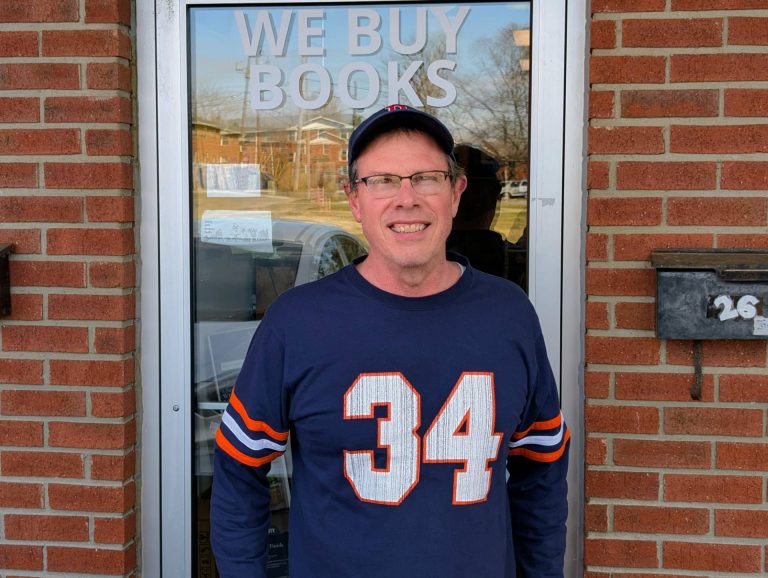
    Joe runs a used and academic book buying operation in Bloomington. His tagline is simple: “We Buy Books.” His business depends on people finding him when they have books to sell, which means his website isn’t a brochure. It’s a lead source.


    Where It Started

    In 2008, Joe needed a website. I built him a custom HTML site for academicscholarlybooks.com, hand-coded, clean, and built to be found. That was the foundation. From there, the work evolved naturally over the years: SEO, social media marketing, Google Analytics setup, Google Workspace administration, and ongoing hosting management.

    Early results were encouraging. By 2011, organic traffic to the site had increased 81% in a single month, a direct result of SEO and social media work we were doing together. Joe noticed. He sent me an email that month just to say so.


    What the Work Actually Looks Like

    Over eighteen years, the scope has shifted with the times, but the core has stayed consistent: keep Joe’s digital presence working, keep it visible, and translate the technical complexity of the modern web into plain English so he can focus on running his business.

    That has meant different things at different moments:

    Web development. The original custom HTML build eventually evolved as the web did. Ongoing updates, content additions, and site maintenance have been a constant.

    SEO and search visibility. I’ve managed Google Search Console for academicscholarlybooks.com for years, monitoring coverage issues, forwarding and interpreting performance reports, and making adjustments when Google’s systems flagged problems.

    Google Analytics. I set up and managed analytics tracking across both his sites, forwarded monthly reports, and updated his settings as platforms changed, including navigating the transition to GA4.

    Google Workspace. Joe’s business email runs through Google Workspace. Over the years, his account has been suspended multiple times due to inactivity or billing lapses. Each time, I’ve stepped in to sort it out before it affected his operations. I also serve as a secondary admin on the account, which means I receive critical alerts that might otherwise go unnoticed.

    Hosting and SSL management. Joe’s sites are hosted on Namecheap, which is cost-effective but requires more active management than larger managed hosting providers. SSL certificates in particular need regular attention, and when renewal notices arrive, they tend to look alarming if you don’t know what you’re looking at. Joe forwards them to me. I handle them.

    Technology advisory. Over the years I’ve shared tools, flagged relevant changes in Google’s advertising products, recommended hardware, and helped Joe evaluate options, from Amazon seller tools to search engine alternatives. None of that shows up on an invoice, but it’s part of what the relationship provides.


    What Makes This Relationship Work

    Joe is technically capable in the ways that matter for his business. He knows books. He knows buyers. He does not particularly enjoy navigating hosting dashboards or deciphering SSL expiration notices, and he’s refreshingly candid about that.

    What he needs is someone he trusts to handle the technical side, someone who will come by when something needs to be done in person, explain what’s happening without condescension, and be reachable when something looks wrong.

    That’s the relationship we’ve built. It’s informal, reliable, and grounded in eighteen years of consistent follow-through.

    “Can you do this for me when you have time?”

    Joe Grant, Academic Scholarly Books

    That kind of trust doesn’t come from a single successful project. It comes from showing up, year after year, and doing what you said you’d do.


    What This Looks Like for a Client Like Joe

    Academic Scholarly Books is a local niche business in a competitive category. Joe isn’t trying to scale nationally. He’s trying to be the person Bloomington residents call when they have a library to sell. That means local search visibility matters enormously, and so does having a site that stays up, stays secure, and stays findable.

    Namecheap hosting keeps his costs down. Active management keeps his site running. Ongoing SEO work keeps people finding him. And having a trusted point of contact means that when something breaks or changes, Joe doesn’t have to figure it out alone.

    That’s the model. It’s not complicated. But it requires consistency, communication, and genuine care about the client’s success, not just their next invoice.


    Still Going

    As of early 2026, Joe and I are still working together. There’s an SSL certificate coming due this spring on academicscholarlybooks.com. We’ll handle it the same way we’ve handled everything else: he’ll flag it, I’ll take care of it, and the site will keep running.

    Eighteen years in, that’s still the job. And I’m glad to do it.


    David Martin Design has served small businesses, nonprofits, and community organizations in Bloomington, Indiana since 2004. If you’re looking for a long-term partner for your web presence, not just a one-time vendor, let’s talk.

  • Economy Fireplace: Website Redesign, Google Business Updates & Workspace Setup

    Economy Fireplace: Website Redesign, Google Business Updates & Workspace Setup

    Project Overview

    Economy Fireplace serves homeowners across the Bloomington area with fireplaces, stoves, and accessories. Ahead of the busy season, they needed a modern website, a clearer path to request quotes, and better alignment across Google tools. We delivered a clean WordPress build, a simple content workflow, and brand updates that make day-to-day operations simpler.

    Economy Fireplace homepage hero with a clear “Request a Quote” button on desktop
    Mobile-first hero with a direct path to “Request a Quote.”

    Goals

    • Faster, mobile-first site with intuitive navigation
    • Frictionless Request a Quote flow routed to the right inbox
    • Consistent presence across Google Business Profile and Google Workspace
    • Simple pipeline for posting finished projects (website + GBP + Facebook)
    • Refresh core brand assets (logo, business cards, signage)

    What We Delivered

    Website Redesign (WordPress + Gutenberg)

    • Modern block-based theme for fast editing without a developer
    • Streamlined IA: Services and Products by Category are easy to scan
    • Custom Request a Quote form mapped to a unified inbox (labels/filters)
    • Gallery pattern for finished installs and before/after stories
    • Core SEO setup, LocalBusiness schema spot-check, performance/QA, and launch

    Google Workspace Ecosystem & Email

    • Google Business Profile alignment: categories, description, photo plan
    • Google Workspace configuration so the team sends/receives from a professional domain and keeps inquiries organized

    Analytics & Hardening

    • Google Search Console + Bing Webmaster Tools connected
    • Microsoft Clarity installed for behavior insights
    • reCAPTCHA added to mitigate spam on forms

    Branding & Collateral (Extras)

    We went beyond the original proposal to unify the brand online and offline.

    Logo Refresh

    Refreshed Economy Fireplace logo—red roofline mark with chimney icon on white
    Refined logo for better contrast on light/dark backgrounds.

    Business Cards & Signage

    • Designed cards and signage; coordinated ordering

    Results

    Customer Experience

    • Faster pages, cleaner navigation, and a direct route to request an estimate

    Operational Clarity

    • Quote requests route to the correct inbox; Google Business Profile and Workspace present a unified front

    Client Feedback

    Screenshot: 5-star Google review from Economy Fireplace with public owner reply
    5-star review highlighting clear communication and on-time, on-budget delivery.

    Tech & Approach

    • Platform: WordPress + Gutenberg
    • Tooling: Google Analytics, Google Search Console, Bing Webmaster Tools, Microsoft Clarity
    • SEO: Structured navigation, on-page basics, LocalBusiness schema spot-check
    • Governance: Photo → post workflow; monthly cadence for finished-project updates
    • Hosting: Managed stack with updates, backups, and monitoring

    Ready for a website that’s faster, clearer, and easier to manage?

    If you’d like a practical WordPress redesign—plus the Google Business alignment, quote workflow, and brand polish that make it work day to day—let’s talk. We’ll scope only what you need and move quickly toward launch.

    Prefer email? david@davidmartindesign.com • 812-650-4405

  • From Roots to Results: The Story of Indiana Greenscape Solutions

    From Roots to Results: The Story of Indiana Greenscape Solutions


    🌱 The Seed of an Idea

    The story of Indiana Greenscape Solutions begins with Kelly and Beth Fort—partners in both family and business—who, along with their four daughters, Rayne, Autumn, Bree, and Eden, had a vision. As lifelong plant science enthusiasts with deep agricultural roots, they wanted to bring high-quality, personalized lawn care and landscaping services to Bloomington, Indiana. With a strong commitment to family values and customer-focused care, they set out to cultivate a business that would serve their community while laying the groundwork for a legacy their daughters could be proud of.

    When Kelly first sat down for a consultation with me, Dave Martin from David Martin Design, he had a clear objective: to build a reliable online presence for Indiana Greenscape Solutions. We weren’t just creating a logo or launching a website—we were sowing the seeds of a brand that would grow and thrive.


    🛠️ Building the Foundation: Branding and Identity

    We started with the name. We wanted something that combined local pride with a clear description of the services offered. After exploring several options, Indiana Greenscape Solutions emerged as the perfect choice—highlighting both the state-specific service area and the business’s focus on thoughtful, solution-oriented lawn care.

    Next came the logo design. We chose a stylized leaf intertwined with the shape of Indiana, subtly reminding customers of the business’s local roots. The color palette blends earth tones for a sense of trust and professionalism with lively greens to evoke growth and vitality. The fonts were deliberately selected: modern and approachable for Indiana Greenscape and more traditional for Solutions to convey reliability.

    The tagline came naturally: “Indiana’s Lawns, Lovingly Landscaped.” It was a phrase that reflected both the meticulous care the Fort family put into their work and the warmth they bring to customer relationships.


    💻 Crafting the Digital Landscape

    A workspace showing Indiana Greenscape Solutions branding materials, including a door hanger and business card, alongside a laptop displaying the company's website with a green-themed design.

    A strong name and logo deserve a home, so we turned our attention to the website, indianagreenscape.com. The goal was to create a simple yet professional site showcasing services, pricing, and a clear call to action for estimates. We focused on intuitive navigation and SEO best practices, ensuring the site is structured for both visitors and search engines.

    During our screen-sharing session, I walked Kelly through the domain registration process. We registered the domain in his name—because, as I always say, I want my clients to own their intellectual property. It’s their business, their brand, their hard work.

    Key features of the site include:

    • Service Pages: Clear descriptions of core services—mowing, fertilization, and aeration.
    • Contact & Estimate Form: Simple, user-friendly forms to encourage visitors to request free estimates.
    • Payment Integration: Stripe was integrated through WordPress plugins, making it easy for customers to pay invoices online.

    🌿 The Services: Precision Lawn Care

    Indiana Greenscape Solutions doesn’t just mow grass; they cultivate healthy, vibrant lawns with science-backed methods and family-level care.

    1. Mowing & Maintenance:
      Each lawn is treated with precision. Mower blades are sharpened weekly to prevent grass damage, and mulching kits recycle nutrients back into the soil. Every mow is accompanied by meticulous edging, trimming, and debris removal.
    2. Fertilization & Weed Control:
      With a certified pesticide applicator license, the team uses a five-treatment lawn care program that supports turf health while ensuring the safety of families, pets, and local wildlife.
    3. Core Aeration:
      This annual service alleviates soil compaction, improving water and nutrient absorption and encouraging deeper root growth.
    4. Seasonal & Specialty Services:
      From soil sampling and garden bed installations to snow removal and Christmas light installations, the Fort family understands the importance of year-round lawn care.

    🚀 Tech, Tools, and Growth Strategies

    Behind the scenes, we implemented several tools to streamline operations and prepare for growth:

    • Google Workspace: For professional email, document sharing, and team communication.
    • Stripe: Integrated for effortless invoicing and secure payment processing.
    • Yardbook CRM: To handle customer relationships, scheduling, and billing.
    • SEO Optimization: Structured content, relevant keywords, and plugins to control meta descriptions, helping the site climb local search rankings.

    We also explored potential winter services like junk removal, fence staining, and pressure washing to maintain year-round revenue streams.


    🌻 Marketing and Community Engagement

    With branding and technology in place, we turned to marketing strategies to generate buzz. The team distributed door hangers and business cards throughout neighborhoods like Blue Ridge (47408). We encouraged customers to leave positive online reviews and launched a referral program offering discounts for word-of-mouth recommendations.

    The #bragbox channel in The Mill’s Slack Workspace became a great way to share success stories and show off the beautiful lawns that Indiana Greenscape Solutions was creating across Bloomington.


    🌐 Looking Ahead: Growing Stronger Every Season

    The Fort family’s dedication to lawn care mirrors the care they put into growing their business. Every stripe on a freshly mowed lawn, every precisely trimmed hedge, and every lush, green yard stands as a testament to their hard work and family values.

    So, if your lawn needs some love, don’t wait!
    Visit indianagreenscape.com to request a free estimate, fill out the contact form, or even shoot them an SMS to get started. Whether it’s a routine mow or a complete landscape transformation, Indiana Greenscape Solutions is ready to make your outdoor space the envy of the neighborhood.

    Here’s to green lawns, thriving roots, and the incredible growth of a family business that started with a simple dream.


    – Dave Martin, Marketing & Design Consultant, David Martin Design 🌱💻🌳

  • My Custom GPTs: Elevating Workflows & Creativity

    My Custom GPTs: Elevating Workflows & Creativity

    Welcome to a showcase of my custom-built GPTs! Each of these tools is designed to solve specific challenges, enhance productivity, and support creativity in web development, digital marketing, and beyond. Click on each link to explore further and see how these unique GPTs can help you or your business.

    Custom GPT Tools by David Martin

    Summary Scribe

    Explore Summary Scribe
    Summary: Summary Scribe is your go-to for casually summarizing meetings, particularly those involving marketing campaigns, strategies, and deliverables. It excels at extracting key points, action items, and decisions while ensuring campaign details and deadlines are clearly captured. It’s a valuable tool for maintaining clarity and keeping projects on track.

    Invoice Snippet Scribe

    Explore Invoice Snippet Scribe
    Summary: Invoice Snippet Scribe distills detailed task lists into concise, under-300 character memos for invoices. This ensures that clients get clear and understandable descriptions of services rendered, enhancing transparency and making invoicing a breeze.

    Web Growth Mentor

    Explore Web Growth Mentor
    Summary: Web Growth Mentor is a friendly, data-driven virtual business coach designed to help web design professionals scale their businesses. With expertise in web design, digital marketing, and entrepreneurship, this GPT offers valuable insights into emerging trends while fostering continuous learning and growth.

    Web Proposal Planner

    Explore Web Proposal Planner
    Summary: Web Proposal Planner is an essential tool for crafting detailed, data-driven proposals for WordPress website development. By analyzing client input and conducting web scraping, this GPT helps you create structured project briefs that cover objectives, timelines, budgets, and deliverables with ease.

    Website Outline Architect

    Explore Website Outline Architect
    Summary: Website Outline Architect works seamlessly with the Yoast SEO plugin for WordPress to ensure your website’s structure is optimized for both users and search engines. This GPT guides you through the best practices for creating intuitive, responsive, and SEO-friendly websites that rank well in search results.

    Web Weaver Wizard

    Explore Web Weaver Wizard
    Summary: Web Weaver Wizard helps craft compelling project proposals tailored to your client’s business model and goals. It focuses on creating persuasive, benefits-driven proposals that resonate with clients while ensuring technical and digital marketing aspects are well addressed.

    Bloomington Content Creator

    Explore Bloomington Content Creator
    Summary: Bloomington Content Creator is your dedicated assistant for producing engaging, SEO-optimized content about the vibrant local scene in Bloomington, Indiana. From restaurant reviews to cultural events, it helps you craft posts that highlight the unique offerings of the city while adhering to SEO best practices.

    Bloomington Online Business Scout

    Explore Bloomington Online Business Scout
    Summary: Bloomington Online Business Scout generates detailed, organized business summaries based on comprehensive research. It helps users compile essential business information, from contact details to online presence, using a structured template that’s perfect for online directories and customer outreach.

    Calendar Event Wizard

    Explore Calendar Event Wizard
    Summary: Calendar Event Wizard assists in scheduling and managing events by generating iCalendar-compatible text entries. Perfect for both technical and non-technical users, this GPT ensures accurate scheduling across time zones and provides clarity in event details.

    A11y SEO Image Wizard

    Explore A11y SEO Image Wizard
    Summary: A11y SEO Image Wizard optimizes your media libraries with SEO-friendly and accessible metadata. From descriptive filenames to alt text and captions, this GPT ensures your images meet both accessibility standards and SEO best practices, enhancing both user experience and search visibility.

  • Navigating Uncharted Waters: Mitzi’s Quest for a Unified Digital Presence

    Navigating Uncharted Waters: Mitzi’s Quest for a Unified Digital Presence

    Navigating Uncharted Waters: Mitzi’s Quest for a Unified Digital Presence

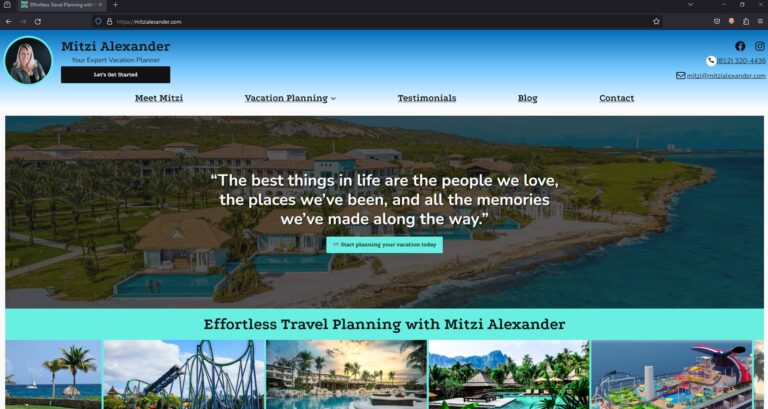
    Mitzi Alexander, an accomplished travel advisor operating in Bloomington, Indiana, found not having a website hindered her ability to effectively reach and engage her target audience.

    Despite her extensive industry expertise and commitment to delivering exceptional service, Mitzi lacked a cohesive online presence. The absence of a dedicated professional website posed a critical challenge, as she had no centralized platform to showcase her offerings comprehensively, share valuable insights through a blog, and cultivate direct connections with potential and existing clients.

    Blogging, in particular, represented a missed opportunity for Mitzi. As a powerful content marketing tool, a well-executed blog could have allowed her to establish thought leadership in the travel advisory space, improve search engine visibility through SEO-optimized content, and foster engagement by providing travellers with informative tips, destination guides, and firsthand accounts of her experiences.

    Without this essential digital asset, Mitzi’s marketing efforts were fragmented across various social media channels and disjointed web properties, resulting in a disorganized and inefficient approach to client acquisition and retention. This lack of a unified digital hub not only hindered her ability to reach a broader audience but also compromised the professional image and credibility she aimed to project.

    Recognizing the escalating importance of a robust online presence in the travel industry, Mitzi understood the urgent need to implement a comprehensive digital strategy. Establishing a well-designed, user-friendly website with a strong content marketing focus would be crucial to elevating her brand, amplifying her expertise, and ultimately driving sustainable business growth in an increasingly competitive landscape.

    Custom CSS for Unique Branding

    We delved deep into the customization of the WordPress 2024 theme, employing custom CSS and useful plugins to tailor the site’s aesthetics to Mitzi’s brand identity. This involved tweaking the color schemes, font styles, and layout structures to create a cohesive look that resonated with the essence of travel and adventure, essential to Mitzi’s business.

    Interactive Features for Enhanced Engagement

    To improve the site’s user engagement, we integrated a variety of interactive features. These included hover effects that reveal more information, smooth transition animations that guide the user through the site, and clickable elements that invite exploration and discovery. Each interactive feature was designed to enhance the user journey and encourage deeper engagement with the content.

    Drop Shadows for Depth and Dimension

    We employed subtle drop shadows in strategic areas of the website to add depth and dimension to the design. These carefully crafted shadows provided a soft lift to images and content blocks, creating a layered effect that drew users’ attention to key elements of the site. This technique not only added visual interest but also helped in organizing content in a more digestible and appealing manner.

    Emojis for Relatability and Fun

    Understanding the importance of relatability and personality in digital communication, we incorporated emojis throughout the website. These emojis were selected to complement the textual content, adding a touch of fun and approachability to the site. Whether used in headings, bullet points, or within blog posts, emojis helped to break down barriers and connect with users on a more personal level.

    ❤️ 🛳️ 🎢 🍹📞✉️📓💬 ❤️ 😃🔍 📝 🗒️🏝️ ⛰️ 🌍☕️🍦👨‍👩‍👦‍👦🩴❤️‍🩹🗼 🌆 🏛️⛰️ 🌌 🔥🌴 🌊 🦜🧭 🗺️🍽️ 🎉❄️ ☀️👨‍👩‍👧‍👦 👩‍❤️‍👨🎢🎡😆🪄📔🍹☀️🍽️ 🥂🧘 ⛷️ 🏄🏊 🧖👶 🧒 🧑 🧓😉

    Custom Features Tailored to Travel Planning

    To specifically cater to the needs of travel planning, we developed custom features that enhanced the functionality of the site. This included dedicated pages for specific customer types, a blog section with different travel categories, and testimonials with shared experiences from Mitzi’s satisfied clients.

    Keyword Research and Integration

    To bolster the website’s search engine visibility and attract Mitzi’s target audience, we employed a comprehensive SEO strategy using the Yoast SEO plugin, a powerful tool known for its effectiveness in optimizing WordPress sites for search engines.

    Our first step was conducting thorough keyword research to identify terms and phrases closely aligned with Mitzi’s services and the interests of her customer personas. This research included a deep dive into travel-related terms, with a focus on niches like honeymoons, cruises, theme parks, and all-inclusive resorts. We meticulously integrated these keywords into the website’s content, including headings, body text, and image alt tags, ensuring relevance and contextuality.

    Optimizing Metadata for Enhanced Discovery

    With the Yoast SEO plugin at our disposal, we optimized the website’s metadata with precision. Titles and meta descriptions for each page were crafted to include targeted keywords while remaining engaging and informative. This not only improved the site’s visibility in search engine results pages (SERPs) but also increased the click-through rate by compelling users with enticing summaries of what Mitzi’s site had to offer.

    Improving Site Structure for SEO

    Understanding the importance of a well-structured website for SEO, we used Yoast’s insights to organize Mitzi’s site content in a way that enhanced navigability and relevance. This included creating a logical hierarchy of headings (H1, H2, H3, etc.) and ensuring that internal linking was both user-friendly and beneficial for search engine crawlers, thereby enhancing the site’s overall SEO performance.

    Content Optimization for Engagement and Relevance

    Each piece of content, especially the blog articles, was carefully optimized to strike a balance between engaging Mitzi’s audience and meeting SEO best practices.

    Outcome

    In the journey of building and launching Mitzi’s website, our collaboration was not just a one-time project but the beginning of an ongoing partnership. We are committed to providing Mitzi with continuous support, ensuring her website remains up-to-date, secure, and aligned with the latest web standards and trends. Our team is here for regular maintenance, updates, and to answer any questions or address any challenges that may arise.

    Looking ahead, we see a wealth of opportunities for future projects with Mitzi. As her business evolves and her needs grow, we are excited to explore new avenues to enhance her digital presence further. Whether it’s expanding the website’s functionality, integrating new tools and features, or embarking on targeted digital marketing campaigns, we are eager to continue our collaboration.

    Our goal is to be more than just a service provider for Mitzi; we aim to be a trusted partner in her business’s growth. By staying engaged and proactive, we anticipate the needs of her travel advisory business and offer solutions that not only solve immediate challenges but also pave the way for new opportunities. This long-term partnership underscores our dedication to not just meeting but exceeding Mitzi’s expectations, driving her business forward in an ever-evolving digital landscape.

    David Martin shares his final thoughts on the project:

    Dave Martin: “Working with Mitzi on her website has been a uniquely rewarding experience. It’s always a pleasure to receive referrals from existing clients, and having the opportunity to work closely with both Mitzi and her husband has truly been a highlight. The collaborative spirit of this project allowed us to delve deep into Mitzi’s vision and bring it to life in a way that resonates with her passion for travel. It’s projects like these that remind me why I love what I do.”

    The project with Mitzi Alexander was more than just building a website; it was about capturing the essence of her passion for travel and creating a digital space that reflects that enthusiasm. The collaborative process, from conceptualization to launch, has been a testament to the power of partnership and shared vision. As a team, we look forward to supporting Mitzi in her ongoing digital journey and are excited about the potential for future collaborations that continue to push the boundaries of design and functionality.