Tag: Small Business

  • Your Google Business Profile: A Practical Guide for Local Businesses

    Your Google Business Profile: A Practical Guide for Local Businesses

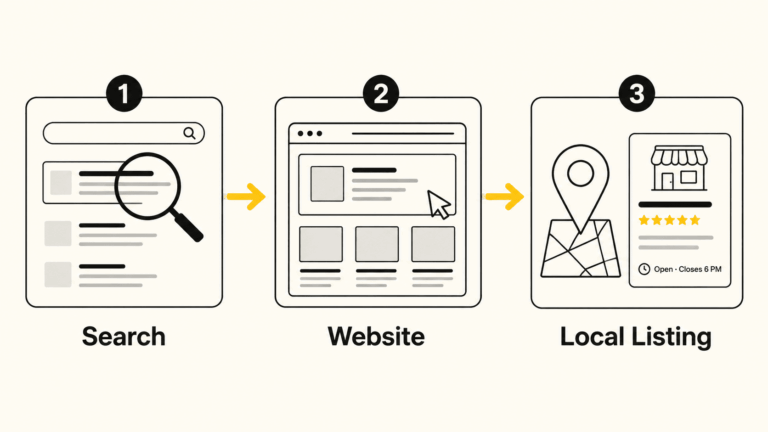
    If someone searches for your type of business in Bloomington right now, the first thing they’ll likely see isn’t your website. It’s your Google Business Profile: the panel that appears in Google Maps and in the results sidebar with your name, hours, photos, reviews, and a button to call or get directions.

    That listing is often making a first impression before anyone ever clicks through to your site. And yet, for many local businesses, it’s either incomplete, out of date, or simply never been given much attention.

    This guide is for the business owner who wants to understand what their Google Business Profile actually does, what to do with it, and how to keep it working for them over time, without a lot of jargon or confusion.

    What a Google Business Profile Actually Is

    Google Business Profile (GBP) is a free tool that lets you control how your business appears in Google Search and Google Maps. When you claim and manage your profile, you’re telling Google and the people searching who you are, where you are, when you’re open, and what you do.

    It’s not a social media account, and it’s not a replacement for a website. Think of it as your public information card on Google’s system. Google decides how prominently to display it, but you control what’s on it.

    For businesses that depend on local customers, such as a contractor in Ellettsville, a restaurant on the square, or a nonprofit serving Monroe County, this profile is one of the highest-value tools you have. It’s free, it’s visible, and it directly affects whether people find you when they’re actively looking for what you offer.

    Claiming and Verifying Your Profile

    Before you can manage your profile, you need to claim it. In many cases, Google has already created a basic listing for your business based on information it’s found elsewhere. That listing exists whether you’ve touched it or not.

    How to claim it:

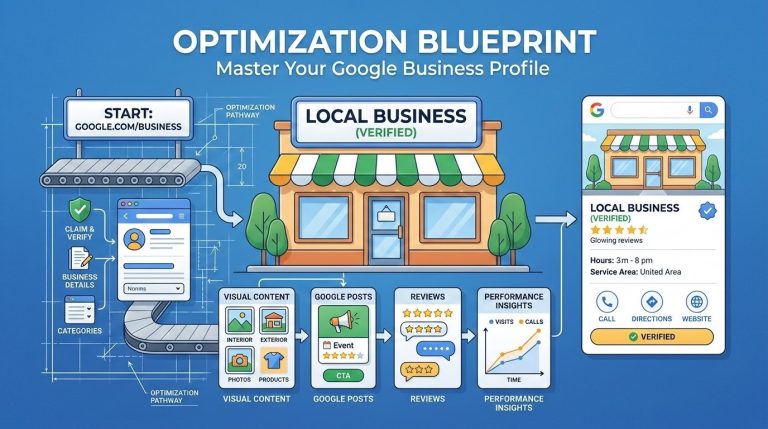
    1. Go to google.com/business and sign in with a Google account you control
    2. Search for your business name and address
    3. If a listing exists, request ownership and Google will guide you through verification
    4. If no listing exists, you can create one from scratch

    Verification is the step Google uses to confirm you’re legitimately associated with the business. The most common method is a postcard mailed to your business address with a code. Some businesses qualify for phone, email, or video verification instead. Service-area businesses (those without a fixed storefront) can still claim a profile but should set a service area rather than displaying a home address.

    One note: The verification process can take a few days to a couple of weeks. Don’t let that stop you from getting started.

    The Profile Sections That Matter Most

    Once you’re in, there’s a lot to fill out. Not all of it carries equal weight. Here’s where to focus first.

    Business Name, Address, and Phone

    These need to be accurate and consistent with how your business appears everywhere else online: on your website, in local directories, on social media. Even small differences (abbreviating “Street” vs. spelling it out, or using a local number vs. an 800 number) can create confusion for Google’s systems. Consistency matters more than most people realize.

    Business Categories

    This is one of the most consequential fields on your profile. Your primary category tells Google what type of business you are, and it directly influences which searches you’re eligible to appear in.

    Choose the most specific, accurate primary category available, not the broadest one. If you’re a plumber, choose “Plumber,” not “Contractor.” If you’re a Mexican restaurant, choose “Mexican Restaurant,” not “Restaurant.”

    You can add secondary categories for other services you offer. Be selective. Adding categories that don’t fit your business can actually hurt your relevance for the searches that matter most.

    Business Description

    You have 750 characters to describe your business. Use them to explain what you do, who you serve, and what makes your business worth contacting. Write it for a person, not a search engine. Don’t try to stuff keywords into every sentence; that approach is obvious and unhelpful.

    A good description is specific, honest, and grounded. Mention the community you serve if that’s relevant. Mention how long you’ve been in business if that builds credibility. Skip the superlatives.

    Hours

    Keep these accurate, including holiday hours. When your hours are wrong, people show up to a closed door. That’s a frustrating experience that reflects on your business, not on Google.

    Most GBP accounts let you set special hours for holidays in advance. This is worth doing. It takes a few minutes and prevents a lot of confusion.

    Services and Products

    Many businesses skip this section entirely. That’s a missed opportunity. Google uses your services list to match you with relevant searches, and some of these entries show up directly on your profile card.

    List the specific services or products you offer. You can add descriptions and prices. Don’t overthink it; just be accurate and reasonably complete.

    Attributes

    Attributes are additional facts about your business: accessible entrance, LGBTQ+-friendly, women-owned, outdoor seating, accepts credit cards, and so on. These appear on your profile and can filter search results for people with specific needs.

    Go through the attributes available for your business category and check the ones that apply. Some of these matter more than you’d expect to specific segments of customers.

    Photos and Visual Content

    Profiles with photos consistently outperform those without. This isn’t a surprise. People want to see where they’re going, who they’re working with, and what to expect.

    What to add:

    • A cover photo that represents your business clearly (exterior, team, or work environment)
    • A logo
    • Interior and exterior shots if you have a physical location
    • Photos of your work, products, or team
    • Real photos, not stock images; authenticity matters here

    You don’t need a professional shoot to get started. Decent photos taken on a modern phone are fine. What matters more than production quality is accuracy and relevance.

    A practical note: Google allows anyone, including customers, to add photos to your profile. You can’t remove most of these. The best way to manage your visual presence is to upload enough good photos of your own that the profile accurately represents your business.

    Update your photos periodically. A profile with photos from 2018 gives people the impression that nothing has changed, or that no one is paying attention.

    Google Posts

    Most business owners have never heard of Google Posts, and most who have don’t use them. That’s a missed opportunity, because they’re a straightforward way to add current, relevant content directly to your profile.

    A Google Post is a short update (text plus an optional photo and call-to-action button) that appears on your profile in search results. Posts expire after seven days or when an event ends, so they’re most useful for things like:

    • Current promotions or sales
    • Upcoming events
    • New products or services
    • Seasonal announcements
    • Anything time-sensitive you want customers to know about

    They don’t dramatically change your rankings, but they do give people more reason to engage with your profile, and they signal to Google that your profile is actively maintained.

    Posting once a week or every two weeks is plenty for most businesses.

    The Q&A Section

    The Q&A section on your profile allows anyone to ask a question about your business, and anyone to answer it. That includes your customers, but it also includes strangers who may or may not give accurate information.

    This is one of the most overlooked parts of a Google Business Profile, and it’s also one of the most practical.

    What you should do:

    • Periodically check your Q&A section for new questions
    • Answer any that have come in, especially if the existing answer is wrong or missing
    • Seed the section yourself by asking and answering common questions proactively (“Do you offer free estimates?” “Is parking available?” “Do you work with insurance?”)

    By populating Q&A with accurate answers to questions you know customers ask, you reduce confusion and help people make faster decisions. It also fills the profile with useful, relevant content.

    Reviews: The Part Most Businesses Find Uncomfortable

    Reviews are one of the strongest signals in local search. A business with many recent, relevant reviews tends to rank better than one with few or none, all else being equal. More importantly, reviews are often what tips the decision for a potential customer reading your profile.

    Getting Reviews

    The most effective thing you can do is simply ask, directly, after a good experience. “Would you be willing to leave us a Google review? It really helps.” Many satisfied customers never think to leave one unless they’re reminded.

    You can make this easier by sharing a direct link to your review section. Google provides one in your profile dashboard. Include it in follow-up emails, on a business card, or in a text to a customer who just expressed satisfaction.

    What you should not do: offer incentives for reviews, ask only customers you know will say something positive, or use any service that generates fake reviews. These practices violate Google’s policies and, more fundamentally, they undermine the trust that makes reviews valuable in the first place.

    Responding to Reviews

    Respond to every review, positive and negative. For positive reviews, a brief, specific thank-you is enough. Don’t use a copied template for every response; it reads as indifferent.

    For negative reviews, the goal is not to win an argument. It’s to respond in a way that demonstrates to future customers that you take concerns seriously and handle them professionally. Keep your response calm, brief, and constructive. Acknowledge the concern, offer to make it right if appropriate, and move on.
    For a more detailed look at this, see my post on responding to negative reviews on Google Business.

    What Affects Your Ranking in Local Search

    Google uses a combination of signals to decide which businesses appear in the “local pack,” the map and three-listing block that appears near the top of local search results. The three primary factors are:

    Relevance: Does your profile match what the person searched for? This is why category selection and service descriptions matter.

    Distance: How far is your business from the person searching, or from the location they specified?

    Prominence: How well-known and trusted is your business based on available information? This includes review quantity and quality, citation consistency across the web, links to your website, and the completeness of your profile. For a closer look at citation work, see my local search marketing service.
    You can’t do much about distance. But relevance and prominence are both things you can work on systematically over time. I cover all three as a connected whole through my Local SEO service.

    GBP and AI-Powered Search

    Google’s AI-generated summaries, the kind that now appear at the top of many search results, pull from publicly available sources, and your Google Business Profile is one of them. A complete, accurate, regularly updated profile gives AI systems more reliable information to work with when describing your business to someone who’s searching.

    This is the same principle behind other emerging practices like llms.txt files: the more clearly and accurately you represent your business in structured, public sources, the better positioned you are as search continues to evolve.

    Ongoing Maintenance: What “Keeping It Current” Actually Means

    A Google Business Profile isn’t something you set up once and forget. It needs periodic attention. Here’s a realistic maintenance checklist:

    TaskFrequency
    Check for new Q&A questionsMonthly
    Respond to new reviewsWithin a week of posting
    Update hours for upcoming holidaysBefore each holiday
    Add a Google PostEvery 1-2 weeks
    Upload new photosEvery 1-2 months
    Review your categories and servicesEvery 6 months
    Check for unauthorized editsMonthly

    That last item deserves a note: Google allows users to suggest edits to any profile, and sometimes those suggestions are accepted automatically. It’s worth logging in regularly to confirm your information hasn’t been changed without your knowledge.

    When to Get Help

    Many business owners can manage their Google Business Profile on their own once they understand what’s involved. The setup and optimization work is more effort upfront; ongoing maintenance is lighter.

    That said, some situations benefit from outside help:

    • You’ve never claimed your profile and aren’t sure where to start
    • Your profile has inaccurate information you can’t seem to correct
    • You’ve been suspended or face a verification issue
    • You want your profile integrated into a broader local SEO strategy
    • You simply don’t have time to keep up with it consistently

    I help Bloomington-area businesses claim, set up, optimize, and maintain their Google Business Profiles as part of my Local SEO service. If you’re not sure where your profile stands, a conversation is a reasonable first step.

    Summary: What to Focus On

    If you take nothing else from this guide, here’s the short version:

    1. Claim and verify your profile if you haven’t already
    2. Complete every major section: name, categories, description, hours, services, attributes
    3. Add real photos and keep them updated
    4. Ask for reviews from satisfied customers, and respond to all of them
    5. Check in regularly, at least once a month, to catch anything that needs attention

    Your Google Business Profile won’t replace a well-built website or a consistent long-term marketing effort. But for local visibility, it’s one of the most direct tools you have, and it costs nothing but time.


    David Martin Design is based in Bloomington, Indiana and works with small businesses, nonprofits, and community organizations on web design, local SEO, and digital marketing. Learn more about our work

  • How Much Does a WordPress Website Actually Cost?

    How Much Does a WordPress Website Actually Cost?

    If you’ve ever searched for website pricing online, you already know the frustration. Most answers are some version of “it depends” — followed by a range so wide it tells you almost nothing.

    The truth is, cost does vary. But the reasons why are pretty straightforward, and once you understand them, you can walk into any conversation with a web designer knowing exactly what to expect.

    This post breaks down real pricing for WordPress websites — with context specific to Bloomington, Indiana — so you can plan your budget with confidence.


    What You’re Actually Paying For

    A professional website isn’t just a collection of pages. When you hire a local web designer, you’re paying for a process that includes:

    Discovery and Planning

    Understanding your business, your audience, and what the site needs to accomplish — before a single page is designed.

    Design and Content Structure

    Deciding how information is organized, how the site looks on mobile and desktop, and how visitors move from page to page.

    Development and Testing

    Building the site in WordPress, configuring plugins, setting up forms, testing across browsers and devices, and making sure everything works before launch.

    Launch and Handoff

    Moving the site live, configuring your domain and hosting, and making sure you know how to manage your own content going forward.

    Ongoing Support

    Most professional relationships don’t end at launch. Maintenance, updates, security monitoring, and occasional changes are part of keeping a site healthy long-term.

    This is why a professionally built WordPress site costs more than a $500 Fiverr gig or a DIY Wix build. You’re not just buying a template — you’re buying the decisions, the experience, and the accountability that comes with working with someone who knows your market.


    Real Price Ranges for Bloomington-Area Projects

    Here’s what WordPress websites actually cost in the Bloomington, Indiana market. These ranges reflect real project scopes — not padded estimates, not race-to-the-bottom quotes.


    Here’s what WordPress websites actually cost in the Bloomington, Indiana market. These ranges reflect real project scopes — not padded estimates, not race-to-the-bottom quotes.

    Simple Brochure Site (3-5 pages)

    Good for: solo practitioners, new businesses, and service providers who need a clean, professional presence.

    $1,500 – $3,000


    • Mobile-friendly design
    • Basic on-page SEO setup
    • Contact form
    • Google Business Profile alignment

    Small Business Site (6-12 pages)

    Good for: established local businesses, restaurants, contractors, retail shops, and service companies with multiple offerings.

    $3,000 – $6,000


    • Custom design aligned to your brand
    • Full SEO foundation (Rank Math)
    • Google Business Profile integration
    • Blog setup and analytics tracking

    Nonprofit or Community Organization Site

    Good for: nonprofits, civic organizations, and community groups that need accessible, grant-ready websites.

    $3,500 – $6,500


    • WCAG accessibility compliance
    • Donation or volunteer form integrations
    • Event or program pages
    • Accessibility-first design throughout

    Site With Special Functionality

    Good for: businesses needing IDX/MLS integrations, booking systems, membership portals, or custom form workflows.

    $5,000 – $10,000+


    • Third-party integrations (IDX, booking, portals)
    • Custom form development
    • Data compliance requirements (DOT, HIPAA, etc.)
    • Complex content management workflows

    Redesign of an Existing Site

    Good for: businesses with an existing WordPress site that’s outdated, slow, or no longer reflects the brand.

    $2,500 – $5,000


    • Depends on how much existing content can be reused
    • Whether a hosting migration is needed
    • How much cleanup work the old site requires

    A note on local vs. national pricing

    Bloomington rates reflect a local market. You’re not paying Chicago or Indianapolis agency overhead. National agencies often quote $10,000-$25,000 for projects that a local designer handles for $3,000-$6,000 — with more personalized service and faster communication. That said, quotes under $1,000 for a full business site are worth scrutinizing carefully.


    Ongoing Costs to Plan For

    Many clients focus entirely on the build and overlook what comes after. Here’s what to budget for once your site is live.

    Hosting

    Shared hosting is cheaper but slower and less secure. A managed or VPS hosting environment is worth the extra cost for most business sites.

    $20 – $60

    PER MONTH

    Domain Renewal

    Your domain name renews annually. Make sure it’s registered in your name, not your web designer’s.

    $15 – $20

    PER YEAR

    Maintenance Retainer

    This covers WordPress core updates, plugin updates, daily backups, security monitoring, uptime checks, and occasional support. Skipping maintenance is the most common reason sites get hacked, break after an update, or fall behind on performance.

    $150 – $500

    PER MONTH

    Plugin Licenses

    Some plugins are free. Others — for forms, SEO, page builders, sliders, or e-commerce — require annual license renewals. A good designer will tell you upfront what licenses your site depends on.

    $0 – $300

    PER YEAR

    SSL Certificate

    Usually included with your hosting plan at no extra cost. This is the padlock icon that appears in your browser and tells visitors your site is secure.

    Usually free

    INCLUDED WITH HOSTING


    What Affects the Price Most

    Within any project type, these are the variables that move the number up or down.

    Number of Pages and Complexity

    A 5-page site takes less time than a 20-page site. Straightforward pages take less time than pages with custom layouts or interactive elements.

    Content Readiness

    The Biggest Variable We See in Bloomington Projects

    Clients who arrive with written copy, photos, and a clear sense of what they want move faster and spend less. Clients who need help creating content — writing, photography, gathering materials — add time and cost to the project.

    If you’re not sure what to prepare, ask your designer for a client checklist before the project begins.

    Custom Functionality

    Contact forms are standard. IDX integrations, booking systems, membership portals, and DOT-compliant employment applications are not. Each adds development time.

    Timeline

    Standard projects run 4-8 weeks. If you need something faster, expect to pay a rush premium.

    Ongoing Support Included

    Some quotes are build-only. Others include a period of post-launch support. Make sure you know which you’re getting.


    Red Flags to Watch For

    Not all quotes are equal. Here’s what to watch for when evaluating proposals.

    No Defined Scope

    A quote for “a website” with no page count, no deliverables list, and no timeline is a guess, not a proposal. Ask for specifics before signing anything.

    Unclear Ownership

    Who owns the domain after the project? Who controls the hosting account? You should own both. If a designer won’t transfer full control to you, that’s a problem.

    Unusually Low Quotes

    A quote under $1,000 for a full business site almost always means something is missing — content creation, mobile testing, SEO setup, or post-launch support. Sometimes all four.

    No Handoff or Training

    A good designer leaves you able to manage your own site. If there’s no plan for training or documentation, ask why.

    No Clear Post-Launch Plan

    What happens when something breaks six months after launch? Who do you call? Make sure you know the answer before the project starts.


    How to Get an Accurate Quote

    What to Bring to the First Conversation

    • A clear sense of your goals (more leads, online bookings, credibility, etc.)
    • A rough list of pages you think you need
    • Examples of sites you like — and why
    • Your timeline and any hard deadlines
    • Whether you have content ready or need help creating it

    Questions to Ask Any Designer

    Before You Sign
    • What’s included in this quote, and what’s not?
    • Who will own the domain and hosting account?
    • What does the handoff look like — will I be trained on managing my own site?
    • What happens if something breaks after launch?
    • Do you offer ongoing maintenance, and what does it cost?
    About Their Experience
    • Have you worked with businesses like mine before?
    • Can I see examples of similar projects?
    • Who will actually be doing the work?

    The Bottom Line

    A professionally built WordPress website is an investment — not just an expense. A well-built site reduces your day-to-day workload, builds credibility with people who find you online, and keeps working for you long after launch.

    What You Should Expect to Spend

    For most Bloomington small businesses and nonprofits, a realistic budget looks like this:

    • Build: $3,000-$6,000 for a complete small business site
    • Hosting and maintenance: $200-$600/month ongoing
    • Content and photography: Variable, but worth planning for upfront

    What You Get for That Investment

    A site that’s fast, accessible, secure, and built to rank in local search. One you can update yourself. One that reflects your business accurately and makes it easy for the right people to contact you.

    Three men smiling at The Mill coworking space in Bloomington, Indiana, seated in front of a large chalkboard mural referencing the 36th Annual Women's Little 500. Mural by Alice Knipstine.
    A working session at The Mill in Bloomington — one of my favorite spots to connect with clients and collaborators.

    Ready to Talk About Your Project?

    If you’re a Bloomington business owner or nonprofit leader and you want a straightforward conversation about what your project would actually cost — no pressure, no vague estimates — I’d be glad to talk.

    Schedule a free consultation


    David Martin Design has been building WordPress websites for Bloomington businesses and nonprofits since 2004. We’re a Chamber member, locally rooted, and committed to ethical, accessible web design.

  • Eighteen Years of Keeping a Bookstore Online

    Eighteen Years of Keeping a Bookstore Online

    A long-term partnership with Academic Scholarly Books in Bloomington, Indiana

    Some client relationships are defined by a single project. Others are defined by time.

    My work with Joe Grant of Academic Scholarly Books falls squarely in the second category. We’ve been working together since 2008, through platform changes, hosting migrations, Google’s many evolutions, and the full arc of what it means to have a small business presence on the web.

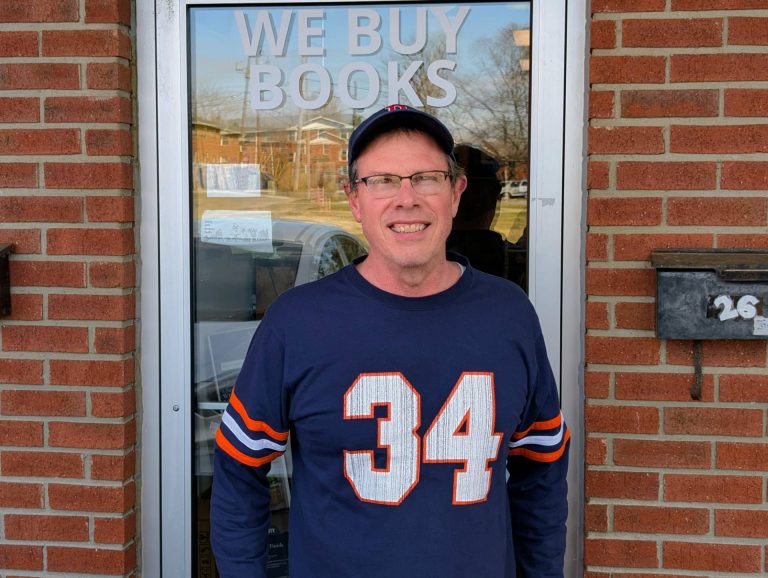
    Joe runs a used and academic book buying operation in Bloomington. His tagline is simple: “We Buy Books.” His business depends on people finding him when they have books to sell, which means his website isn’t a brochure. It’s a lead source.


    Where It Started

    In 2008, Joe needed a website. I built him a custom HTML site for academicscholarlybooks.com, hand-coded, clean, and built to be found. That was the foundation. From there, the work evolved naturally over the years: SEO, social media marketing, Google Analytics setup, Google Workspace administration, and ongoing hosting management.

    Early results were encouraging. By 2011, organic traffic to the site had increased 81% in a single month, a direct result of SEO and social media work we were doing together. Joe noticed. He sent me an email that month just to say so.


    What the Work Actually Looks Like

    Over eighteen years, the scope has shifted with the times, but the core has stayed consistent: keep Joe’s digital presence working, keep it visible, and translate the technical complexity of the modern web into plain English so he can focus on running his business.

    That has meant different things at different moments:

    Web development. The original custom HTML build eventually evolved as the web did. Ongoing updates, content additions, and site maintenance have been a constant.

    SEO and search visibility. I’ve managed Google Search Console for academicscholarlybooks.com for years, monitoring coverage issues, forwarding and interpreting performance reports, and making adjustments when Google’s systems flagged problems.

    Google Analytics. I set up and managed analytics tracking across both his sites, forwarded monthly reports, and updated his settings as platforms changed, including navigating the transition to GA4.

    Google Workspace. Joe’s business email runs through Google Workspace. Over the years, his account has been suspended multiple times due to inactivity or billing lapses. Each time, I’ve stepped in to sort it out before it affected his operations. I also serve as a secondary admin on the account, which means I receive critical alerts that might otherwise go unnoticed.

    Hosting and SSL management. Joe’s sites are hosted on Namecheap, which is cost-effective but requires more active management than larger managed hosting providers. SSL certificates in particular need regular attention, and when renewal notices arrive, they tend to look alarming if you don’t know what you’re looking at. Joe forwards them to me. I handle them.

    Technology advisory. Over the years I’ve shared tools, flagged relevant changes in Google’s advertising products, recommended hardware, and helped Joe evaluate options, from Amazon seller tools to search engine alternatives. None of that shows up on an invoice, but it’s part of what the relationship provides.


    What Makes This Relationship Work

    Joe is technically capable in the ways that matter for his business. He knows books. He knows buyers. He does not particularly enjoy navigating hosting dashboards or deciphering SSL expiration notices, and he’s refreshingly candid about that.

    What he needs is someone he trusts to handle the technical side, someone who will come by when something needs to be done in person, explain what’s happening without condescension, and be reachable when something looks wrong.

    That’s the relationship we’ve built. It’s informal, reliable, and grounded in eighteen years of consistent follow-through.

    “Can you do this for me when you have time?”

    Joe Grant, Academic Scholarly Books

    That kind of trust doesn’t come from a single successful project. It comes from showing up, year after year, and doing what you said you’d do.


    What This Looks Like for a Client Like Joe

    Academic Scholarly Books is a local niche business in a competitive category. Joe isn’t trying to scale nationally. He’s trying to be the person Bloomington residents call when they have a library to sell. That means local search visibility matters enormously, and so does having a site that stays up, stays secure, and stays findable.

    Namecheap hosting keeps his costs down. Active management keeps his site running. Ongoing SEO work keeps people finding him. And having a trusted point of contact means that when something breaks or changes, Joe doesn’t have to figure it out alone.

    That’s the model. It’s not complicated. But it requires consistency, communication, and genuine care about the client’s success, not just their next invoice.


    Still Going

    As of early 2026, Joe and I are still working together. There’s an SSL certificate coming due this spring on academicscholarlybooks.com. We’ll handle it the same way we’ve handled everything else: he’ll flag it, I’ll take care of it, and the site will keep running.

    Eighteen years in, that’s still the job. And I’m glad to do it.


    David Martin Design has served small businesses, nonprofits, and community organizations in Bloomington, Indiana since 2004. If you’re looking for a long-term partner for your web presence, not just a one-time vendor, let’s talk.

  • Why I’m Proud to Be a Chamber Member (Since Way Back When)

    Why I’m Proud to Be a Chamber Member (Since Way Back When)

    Being part of the Greater Bloomington Chamber of Commerce isn’t just about paying dues or adding a badge to your website — it’s about joining a local network of people who care about this community and want to see each other succeed.

    Fast forward to today, and I’m still grateful for the connections, visibility, and resources the Chamber provides. From local advocacy to business referrals, community partnerships, and even media features like the recent spotlight on Raymond joining our team — the Chamber continues to create space for real relationships and shared success.

    Whether it’s co-hosting events at The Mill, showing up for ribbon cuttings, or contributing to the directory, this organization has consistently supported my business and the clients I serve. And I’m not alone — over 850 businesses strong, the Chamber plays a big role in shaping our local economy and building momentum for Monroe County.

    To the Chamber team: thank you. I appreciate your work, your outreach, and your support. And if you’re a small business owner in Bloomington wondering whether it’s worth joining — it is. I’ve experienced the long-game value of staying engaged, showing up, and being part of something larger than myself.

    Let’s keep growing together.

    Dave Martin
    Web Designer & Digital Marketing Strategist

  • From Roots to Results: The Story of Indiana Greenscape Solutions

    From Roots to Results: The Story of Indiana Greenscape Solutions


    🌱 The Seed of an Idea

    The story of Indiana Greenscape Solutions begins with Kelly and Beth Fort—partners in both family and business—who, along with their four daughters, Rayne, Autumn, Bree, and Eden, had a vision. As lifelong plant science enthusiasts with deep agricultural roots, they wanted to bring high-quality, personalized lawn care and landscaping services to Bloomington, Indiana. With a strong commitment to family values and customer-focused care, they set out to cultivate a business that would serve their community while laying the groundwork for a legacy their daughters could be proud of.

    When Kelly first sat down for a consultation with me, Dave Martin from David Martin Design, he had a clear objective: to build a reliable online presence for Indiana Greenscape Solutions. We weren’t just creating a logo or launching a website—we were sowing the seeds of a brand that would grow and thrive.


    🛠️ Building the Foundation: Branding and Identity

    We started with the name. We wanted something that combined local pride with a clear description of the services offered. After exploring several options, Indiana Greenscape Solutions emerged as the perfect choice—highlighting both the state-specific service area and the business’s focus on thoughtful, solution-oriented lawn care.

    Next came the logo design. We chose a stylized leaf intertwined with the shape of Indiana, subtly reminding customers of the business’s local roots. The color palette blends earth tones for a sense of trust and professionalism with lively greens to evoke growth and vitality. The fonts were deliberately selected: modern and approachable for Indiana Greenscape and more traditional for Solutions to convey reliability.

    The tagline came naturally: “Indiana’s Lawns, Lovingly Landscaped.” It was a phrase that reflected both the meticulous care the Fort family put into their work and the warmth they bring to customer relationships.


    💻 Crafting the Digital Landscape

    A workspace showing Indiana Greenscape Solutions branding materials, including a door hanger and business card, alongside a laptop displaying the company's website with a green-themed design.

    A strong name and logo deserve a home, so we turned our attention to the website, indianagreenscape.com. The goal was to create a simple yet professional site showcasing services, pricing, and a clear call to action for estimates. We focused on intuitive navigation and SEO best practices, ensuring the site is structured for both visitors and search engines.

    During our screen-sharing session, I walked Kelly through the domain registration process. We registered the domain in his name—because, as I always say, I want my clients to own their intellectual property. It’s their business, their brand, their hard work.

    Key features of the site include:

    • Service Pages: Clear descriptions of core services—mowing, fertilization, and aeration.
    • Contact & Estimate Form: Simple, user-friendly forms to encourage visitors to request free estimates.
    • Payment Integration: Stripe was integrated through WordPress plugins, making it easy for customers to pay invoices online.

    🌿 The Services: Precision Lawn Care

    Indiana Greenscape Solutions doesn’t just mow grass; they cultivate healthy, vibrant lawns with science-backed methods and family-level care.

    1. Mowing & Maintenance:
      Each lawn is treated with precision. Mower blades are sharpened weekly to prevent grass damage, and mulching kits recycle nutrients back into the soil. Every mow is accompanied by meticulous edging, trimming, and debris removal.
    2. Fertilization & Weed Control:
      With a certified pesticide applicator license, the team uses a five-treatment lawn care program that supports turf health while ensuring the safety of families, pets, and local wildlife.
    3. Core Aeration:
      This annual service alleviates soil compaction, improving water and nutrient absorption and encouraging deeper root growth.
    4. Seasonal & Specialty Services:
      From soil sampling and garden bed installations to snow removal and Christmas light installations, the Fort family understands the importance of year-round lawn care.

    🚀 Tech, Tools, and Growth Strategies

    Behind the scenes, we implemented several tools to streamline operations and prepare for growth:

    • Google Workspace: For professional email, document sharing, and team communication.
    • Stripe: Integrated for effortless invoicing and secure payment processing.
    • Yardbook CRM: To handle customer relationships, scheduling, and billing.
    • SEO Optimization: Structured content, relevant keywords, and plugins to control meta descriptions, helping the site climb local search rankings.

    We also explored potential winter services like junk removal, fence staining, and pressure washing to maintain year-round revenue streams.


    🌻 Marketing and Community Engagement

    With branding and technology in place, we turned to marketing strategies to generate buzz. The team distributed door hangers and business cards throughout neighborhoods like Blue Ridge (47408). We encouraged customers to leave positive online reviews and launched a referral program offering discounts for word-of-mouth recommendations.

    The #bragbox channel in The Mill’s Slack Workspace became a great way to share success stories and show off the beautiful lawns that Indiana Greenscape Solutions was creating across Bloomington.


    🌐 Looking Ahead: Growing Stronger Every Season

    The Fort family’s dedication to lawn care mirrors the care they put into growing their business. Every stripe on a freshly mowed lawn, every precisely trimmed hedge, and every lush, green yard stands as a testament to their hard work and family values.

    So, if your lawn needs some love, don’t wait!
    Visit indianagreenscape.com to request a free estimate, fill out the contact form, or even shoot them an SMS to get started. Whether it’s a routine mow or a complete landscape transformation, Indiana Greenscape Solutions is ready to make your outdoor space the envy of the neighborhood.

    Here’s to green lawns, thriving roots, and the incredible growth of a family business that started with a simple dream.


    – Dave Martin, Marketing & Design Consultant, David Martin Design 🌱💻🌳