Category: Business Productivity

  • Windows PowerToys Is the Productivity Upgrade Windows Should Have Shipped With

    Windows PowerToys Is the Productivity Upgrade Windows Should Have Shipped With

    If you use Windows every day, you’ve probably felt it: the OS is powerful, but a handful of small things slow you down more than they should.

    That’s where Microsoft PowerToys comes in.

    PowerToys is a free, Microsoft-supported utility suite that adds practical, no-nonsense features to Windows. These aren’t gimmicks—they’re tools that shave seconds and friction off everyday tasks. Over time, that adds up.

    If you work in design, development, strategy, or any role that lives inside a computer all day, PowerToys is absolutely worth installing.


    What Is Windows PowerToys?

    PowerToys is an open-source collection of utilities built by Microsoft and the Windows community. Think of it as “advanced user features” that never quite made it into the core OS.

    The project has roots going back to Windows 95, when Microsoft first released a set of free utilities for power users who wanted to push the boundaries of what the operating system could do. After a long hiatus through Vista, Windows 7, and Windows 8, PowerToys returned in 2019 as an open-source project—and it’s been actively developed ever since.

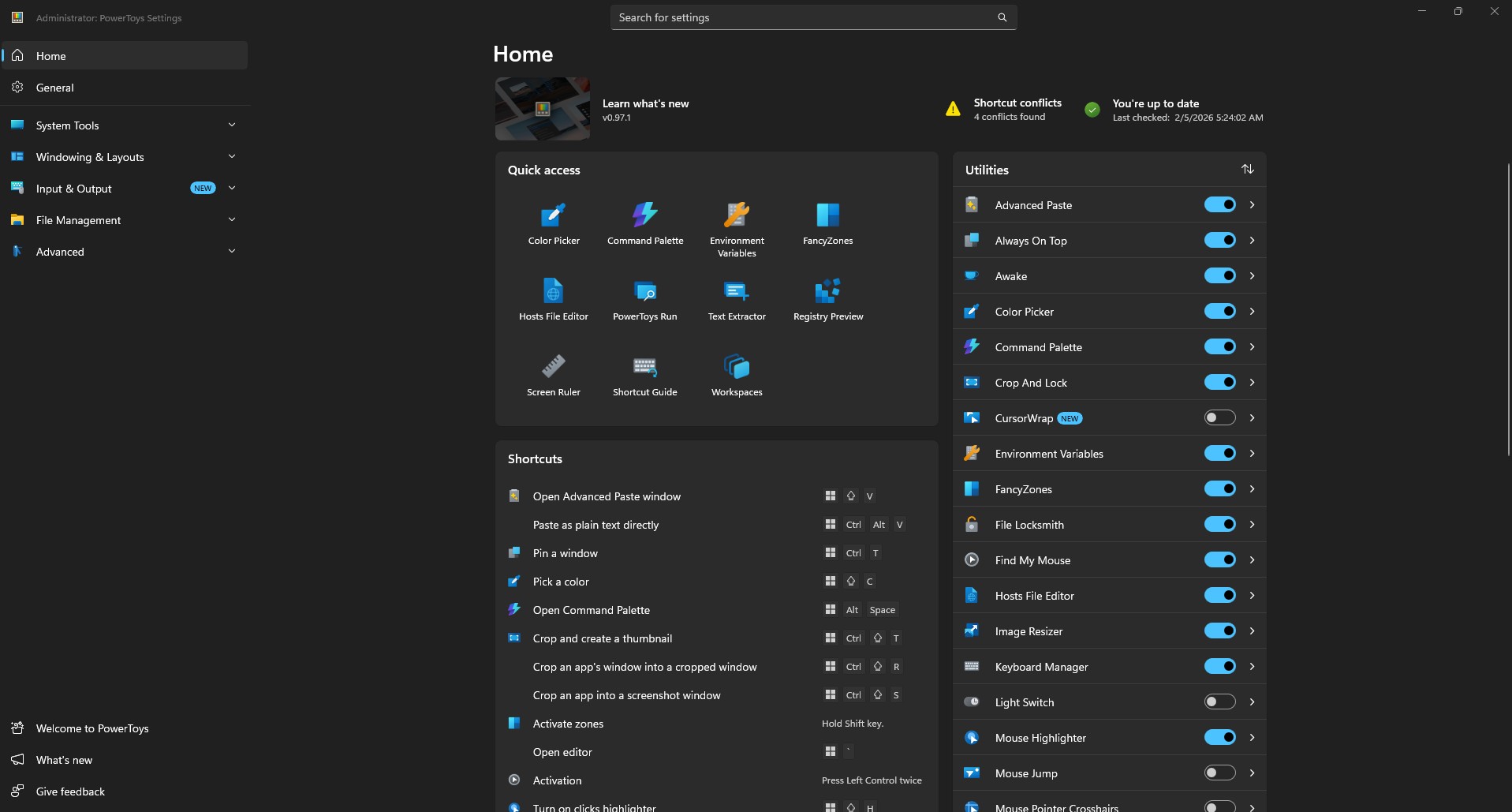
    As of early 2025, the suite includes over 25 utilities. It runs quietly in the background and integrates directly into Windows Explorer, keyboard shortcuts, and window management.

    Once installed, it feels less like an app and more like Windows finally grew up.


    How to Install PowerToys

    Installation is straightforward. You have three options:

    1. Microsoft Store – Search for “PowerToys” and click Install
    2. GitHub – Download the latest release from the PowerToys repository
    3. Windows Package Manager – Run winget install --id Microsoft.PowerToys from the command line

    Once installed, most features are enabled by default. You can toggle individual tools on or off from the PowerToys dashboard.


    The PowerToys Tools I Use the Most

    PowerToys includes a lot of utilities. These are the ones that consistently earn their keep.

    Image Resizer

    Image Resizer lets you right-click any image and resize it instantly. No Photoshop. No export dialogs. No guesswork.

    You can create presets for common use cases: web images, presentations, print, social media, native camera resolutions. Once configured, resizing becomes a one-second operation.

    For designers and content creators, this alone justifies installing PowerToys.

    FancyZones

    FancyZones is a window manager that lets you define custom window layouts and snap apps exactly where you want them.

    As WindowsForum notes, FancyZones “solves a perennial frustration: snapping and positioning windows precisely and efficiently.” Its flexibility outpaces native Windows Snap Assist, with support for custom templates, multiple workspaces, and hotkeys.

    This is especially useful if you use ultrawide or large monitors, juggle design tools with browsers and docs, or hate constantly resizing windows. Press Win + Shift + ` to open the Zone Editor, then drag windows into your defined zones while holding Shift.

    PowerRename

    PowerRename brings advanced batch renaming directly into File Explorer. Right-click selected files, choose “Rename with PowerRename,” and you can replace text across dozens of files, add prefixes or suffixes, use regular expressions, and preview changes before committing.

    If you deal with photos, assets, exports, or client files, this is a lifesaver. The utility is based on Chris Davis’s SmartRename, and it’s been refined over years of community contributions.

    Peek

    Peek lets you preview files with a single shortcut: Ctrl + Space.

    Images, PDFs, text files, and more open instantly in a lightweight preview window. No app switching. No clutter.

    As PCWorld observes, it functions like macOS Quick Look—something Windows users have wanted for years.

    Keyboard Manager

    Keyboard Manager allows you to remap keys and shortcuts globally.

    This is perfect if you switch between operating systems, have a broken or inconvenient key, or want custom shortcuts for repetitive actions. Changes remain active as long as PowerToys runs in the background.


    Tools You Might Have Overlooked

    Beyond the essentials, PowerToys includes several utilities that don’t get as much attention but are genuinely useful.

    Color Picker

    Color Picker is a system-wide eyedropper tool activated with Win + Shift + C. Click anywhere on screen to grab the exact color value in HEX, RGB, HSL, CMYK, or other formats. The color is copied to your clipboard automatically.

    As PCTips notes, this is essential for anyone working with graphics, web design, or content creation. The utility also maintains a history of previously picked colors.

    Text Extractor

    Text Extractor uses OCR (optical character recognition) to copy text from anywhere on your screen. Press Win + Shift + T, select an area, and the text is extracted—whether from an image, video, screenshot, or locked PDF.

    This is one of those tools you don’t think you need until you do.

    File Locksmith

    Ever tried to delete or move a file and received the dreaded “file is in use” error?

    File Locksmith shows you exactly which process is locking the file. Right-click any file in Explorer, select “What’s using this file?” and you’ll see a list of processes. You can then close those processes directly from the utility.

    As How-To Geek explains, this eliminates the frustrating guesswork of figuring out why you can’t modify a file.

    Advanced Paste

    Advanced Paste (Win + Shift + V) goes beyond simple clipboard management. You can paste text as plain text, Markdown, or JSON. There’s also a clipboard history that shows everything you’ve copied.

    If you have an OpenAI API key, you can enable AI-powered paste transformations—summarizing text, translating between languages, or reformatting content on the fly. Imaginet provides examples of using AI paste to rewrite text in specific styles or generate code from descriptions.

    Always On Top

    Need a window to stay visible no matter what? Press Win + Ctrl + T to pin it on top of everything else. The window gets a blue border to indicate it’s pinned.

    Simple, but surprisingly useful for reference windows, timers, or video calls.

    PowerToys Awake

    Awake keeps your computer from sleeping during long tasks—downloads, installations, renders—without touching your power settings.

    You can set it to stay awake indefinitely or on a timer. A tray icon shows the current mode and time remaining.

    Find My Mouse

    Lost your cursor on a large display or multi-monitor setup? Double-tap Ctrl and a spotlight appears around your mouse position.

    TechRepublic calls this especially handy for presentations on large displays when you want to draw attention to a specific area.

    Mouse Without Borders

    This utility lets you control up to four computers with a single mouse and keyboard, share clipboards between machines, and transfer files up to 100MB.

    As Microsoft’s documentation explains, it’s essentially a software KVM switch. All machines need to be on the same network and running Windows. Setup requires generating a security key on one machine and entering it on the others.

    For anyone with multiple workstations or a laptop-desktop setup, this eliminates the need for extra hardware.

    PowerToys Run

    PowerToys Run (Alt + Space) is a quick launcher that searches and opens applications, files, and system tools instantly. It’s modular and supports community plugins for extended functionality.

    If you’ve used Spotlight on macOS, this will feel familiar. Many users find it more reliable than Windows Search for actually launching apps.

    Microsoft has announced that PowerToys Run is getting a major refresh in 2025, with a revamped UI and improved extensibility support. The new version is being called “Command Palette” and will serve as PowerToys Run’s successor.

    Workspaces

    Workspaces lets you launch multiple applications into preset window configurations with a single click.

    Set up your development environment—VS Code on the left, browser on the right, terminal at the bottom—and save it as a workspace. Next time, launch everything in position with one shortcut.

    Screen Ruler

    Activated with Win + Shift + M, Screen Ruler lets you measure pixels on screen using edge detection. Useful for designers checking spacing and alignment without opening a separate tool.

    Shortcut Guide

    Press Win + Shift + / (or hold the Windows key) to see a visual overlay of available keyboard shortcuts for the current desktop state.

    Helpful for discovering shortcuts you didn’t know existed.

    File Explorer Add-ons

    These add-ons extend File Explorer’s Preview Pane to support additional file types: SVG images, Markdown documents, source code with syntax highlighting, PDFs, and more.

    Hosts File Editor

    A simple interface for editing your Windows hosts file—useful for local development, blocking sites, or DNS testing—without manually navigating to system folders.

    Quick Accent

    Quick Accent provides an alternative way to type accented characters when your keyboard doesn’t support them. Hold a key and a popup shows available accented variations.


    Why PowerToys Fits How I Work

    Good tools don’t shout. They reduce friction.

    PowerToys does exactly that. It respects your time, stays out of your way, and improves workflows instead of reinventing them. It’s modular—you enable only what you need—and it’s built by developers who actually use their computers to get work done.

    That aligns with how I think about the tools I recommend to clients: sustainable, practical, and focused on making real tasks easier.


    Should You Install It?

    Yes.

    PowerToys is free, lightweight, actively maintained, and easy to uninstall if you change your mind. Most people who install it never go back.

    You can download it from the Microsoft Store or the GitHub releases page.


    Final Thought

    Windows is already powerful. PowerToys makes it intentional.

    If you care about efficiency, clarity, and tools that quietly make you better at your work, PowerToys belongs on your machine.


    Sources referenced in this article:

  • How I’m Using AI to Build Better Systems for Business and Life

    How I’m Using AI to Build Better Systems for Business and Life

    How I Use AI in My Business

    How I Use AI in My Personal Life

    Personalizing Your AI Experience

    Final Thoughts: AI is a Tool, Systems are the Secret

    👉 Contact Me Here

  • Welcoming Raymond Labban to the David Martin Design Team

    We are thrilled to officially welcome Raymond Labban to the David Martin Design team as a part-time Digital Marketing & SEO Specialist! Raymond brings a fresh perspective and a strong passion for helping businesses thrive online. His skills and dedication are already making an impact, and we’re excited to highlight how he’ll support our growing portfolio of clients.

    About Raymond

    Raymond Labban is a talented professional with a knack for improving digital visibility. His role at David Martin Design involves:

    • Implementing SEO Updates: Conducting keyword research, optimizing site structures, and enhancing technical performance to improve search engine rankings.
    • Content Strategy Development: Crafting tailored strategies to boost engagement and connect businesses with their audiences.
    • Social Media & Reputation Management: Managing client profiles, responding to reviews, and monitoring digital interactions.
    • Local Search Optimization: Ensuring Google and Bing business listings are accurate, optimized, and impactful.
    • Monthly Reporting & Strategy: Assisting with performance reports, keeping clients updated, and driving strategic reviews.

    Contributions So Far

    In his short time with us, Raymond has already made remarkable strides:

    • Website Management: He has helped onboard new projects, including setting up essential tools like WordPress accounts and Gravatar profiles.
    • Digital Enhancements: Raymond has optimized business descriptions, ensuring a clear, professional presence across platforms.
    • Content Collaboration: He’s streamlined processes for crafting SEO-friendly meta descriptions and developed strategies for improved digital engagement.
    • Reputation Management: Raymond facilitated thoughtful responses to online reviews, helping to enhance brand trust and visibility.
    • Team Integration: From setting up Asana tasks to participating in team meetings, Raymond has embraced our collaborative workflow, demonstrating excellent adaptability.

    Commitment to Community and Growth

    At David Martin Design, we pride ourselves on being partners in the growth of our local community. Adding Raymond to our team underscores our dedication to empowering small businesses with high-quality, personalized digital marketing solutions. His work ensures our clients receive tailored support that aligns with their unique goals, and we look forward to seeing the positive impact he’ll continue to make.

    Looking Ahead

    As Raymond deepens his involvement with new projects, we are confident his expertise will further solidify David Martin Design’s reputation as a trusted partner for local businesses. His focus on innovative, data-driven solutions aligns perfectly with our mission to foster meaningful digital transformations.

    Welcome aboard, Raymond! We are excited for all that’s ahead.

  • From Donuts to Data Protection: How BackBlaze Became My Go-To Backup Solution

    From Donuts to Data Protection: How BackBlaze Became My Go-To Backup Solution

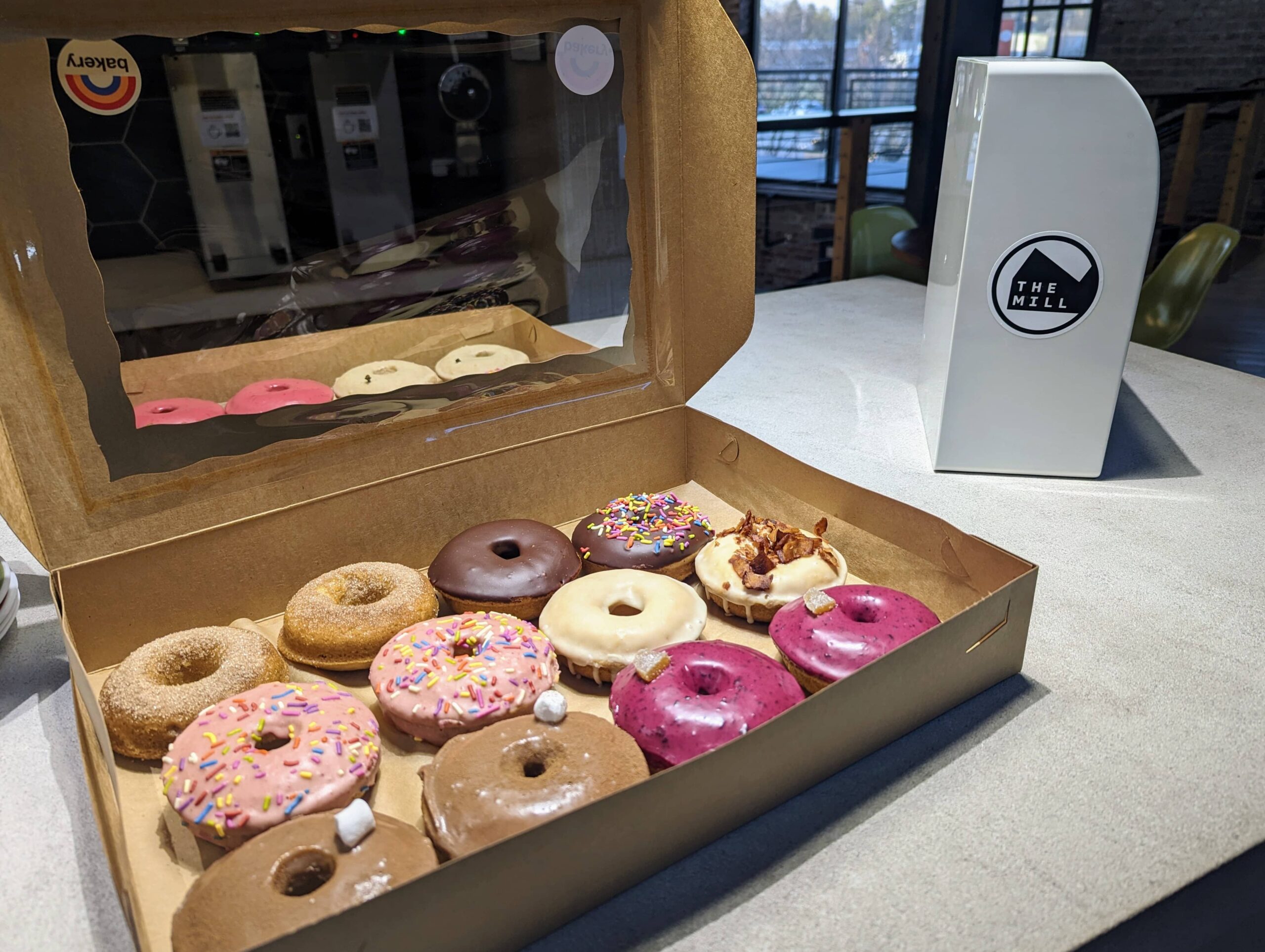
    Earlier this year, I attended one of my favorite local networking events—Design & Donuts—held at The Mill in Bloomington, Indiana. For those unfamiliar, The Mill is more than just a coworking space; it’s the heartbeat of our entrepreneurial community. It’s a place where creators, innovators, and tech enthusiasts collide to share ideas, collaborate on projects, and, of course, enjoy some delicious donuts.

    A box of assorted donuts with various toppings, including sprinkles, chocolate, and glaze, set on a table at The Mill in Bloomington, with The Mill’s logo visible in the background.
    Assorted donuts served at the Design & Donuts event held at The Mill in Bloomington, where creators and innovators gather to network, collaborate, and enjoy local treats.

    The Mill: A Hub for Networking and Innovation

    The Mill provides an energetic atmosphere that fosters creativity and connection. With its modern workspace design and a calendar full of events, it’s a magnet for startups, freelancers, and tech professionals. Whether you’re looking to brainstorm over coffee, attend a workshop, or network with like-minded individuals, The Mill has something for everyone. It’s a space that breathes life into the entrepreneurial spirit of Bloomington.

    Exterior view of The Mill, a modern co-working space in Bloomington with brick walls, large windows, and a welcoming entrance, surrounded by landscaped greenery and seating areas.
    The Mill in Bloomington offers a dynamic co-working environment for startups, freelancers, and tech professionals, featuring a modern design and vibrant community atmosphere.

    Meeting Brian Beach: CTO of BackBlaze

    During the meetup, I had the opportunity to chat with Brian Beach, the CTO of BackBlaze, a company renowned for its affordable and reliable cloud backup solutions. As we sipped coffee and nibbled on donuts, we discussed all things design and technology, diving into the intricacies of web hosting, data protection, and the challenges we face in today’s digital landscape.

    Brian shared insights about his role at BackBlaze and the company’s mission to make cloud storage accessible for everyone. Our conversation naturally steered toward backups—a topic near and dear to anyone managing web servers. As someone who manages web hosting through WHM cPanel on my VPS for IndianaWebHosting.com, I’ve always had a lurking fear of data loss. But thanks to Brian, I found the solution I didn’t even know I was looking for.

    Setting Up BackBlaze: A Game-Changer for My VPS Backups

    Inspired by our conversation, I decided to explore BackBlaze as an option for my VPS backups. After learning that it could easily integrate as an additional backup destination within WHM cPanel, I decided to dive in. The setup process was straightforward, and within no time, my server was securely backing up to a BackBlaze B2 bucket.

    Brian’s expertise was invaluable as we configured the optimal backup settings for my needs. And let me tell you, the peace of mind that comes from knowing your data is safely backed up offsite is priceless. Plus, the cost of BackBlaze was a pleasant surprise—my first monthly bill was just $1.24! It’s incredible to have such a reliable solution without breaking the bank.

    Why Networking Matters

    My experience at The Mill is a perfect example of why networking is so important. It’s not just about exchanging business cards or attending meetings; it’s about forming genuine connections that lead to real-world solutions. Had I not attended that Design & Donuts meetup, I might still be navigating my VPS backups with trepidation. Instead, I now have a robust backup solution, thanks to a casual chat with Brian Beach.

    And, of course, I have to give a shout-out to Brian and the BackBlaze marketing team for the awesome new BackBlaze hat swag! It’s always great to see companies that not only provide excellent service but also support their communities and customers in fun, engaging ways.

    Two men, including Brian Beach, CTO of BackBlaze, posing for a selfie during a meetup at The Mill in Bloomington, discussing cloud backup solutions and web hosting.
    Brian Beach, CTO of BackBlaze, and a fellow attendee at The Mill in Bloomington, discuss cloud storage, web hosting, and data protection during a casual meetup.

    Conclusion: BackBlaze and Beyond

    In the end, what started as a casual morning meetup evolved into a transformative experience for my web hosting business. I’m grateful for the connections made at The Mill and the invaluable advice from Brian Beach. If you’re managing a server and haven’t explored BackBlaze, I highly recommend giving it a try. It’s simple, cost-effective, and offers peace of mind that your data is safe.

    So, here’s to The Mill, Design & Donuts, and the power of community—where even the smallest interactions can lead to significant breakthroughs.

  • My Custom GPTs: Elevating Workflows & Creativity

    My Custom GPTs: Elevating Workflows & Creativity

    Welcome to a showcase of my custom-built GPTs! Each of these tools is designed to solve specific challenges, enhance productivity, and support creativity in web development, digital marketing, and beyond. Click on each link to explore further and see how these unique GPTs can help you or your business.

    Custom GPT Tools by David Martin

    Summary Scribe

    Explore Summary Scribe
    Summary: Summary Scribe is your go-to for casually summarizing meetings, particularly those involving marketing campaigns, strategies, and deliverables. It excels at extracting key points, action items, and decisions while ensuring campaign details and deadlines are clearly captured. It’s a valuable tool for maintaining clarity and keeping projects on track.

    Invoice Snippet Scribe

    Explore Invoice Snippet Scribe
    Summary: Invoice Snippet Scribe distills detailed task lists into concise, under-300 character memos for invoices. This ensures that clients get clear and understandable descriptions of services rendered, enhancing transparency and making invoicing a breeze.

    Web Growth Mentor

    Explore Web Growth Mentor
    Summary: Web Growth Mentor is a friendly, data-driven virtual business coach designed to help web design professionals scale their businesses. With expertise in web design, digital marketing, and entrepreneurship, this GPT offers valuable insights into emerging trends while fostering continuous learning and growth.

    Web Proposal Planner

    Explore Web Proposal Planner
    Summary: Web Proposal Planner is an essential tool for crafting detailed, data-driven proposals for WordPress website development. By analyzing client input and conducting web scraping, this GPT helps you create structured project briefs that cover objectives, timelines, budgets, and deliverables with ease.

    Website Outline Architect

    Explore Website Outline Architect
    Summary: Website Outline Architect works seamlessly with the Yoast SEO plugin for WordPress to ensure your website’s structure is optimized for both users and search engines. This GPT guides you through the best practices for creating intuitive, responsive, and SEO-friendly websites that rank well in search results.

    Web Weaver Wizard

    Explore Web Weaver Wizard
    Summary: Web Weaver Wizard helps craft compelling project proposals tailored to your client’s business model and goals. It focuses on creating persuasive, benefits-driven proposals that resonate with clients while ensuring technical and digital marketing aspects are well addressed.

    Bloomington Content Creator

    Explore Bloomington Content Creator
    Summary: Bloomington Content Creator is your dedicated assistant for producing engaging, SEO-optimized content about the vibrant local scene in Bloomington, Indiana. From restaurant reviews to cultural events, it helps you craft posts that highlight the unique offerings of the city while adhering to SEO best practices.

    Bloomington Online Business Scout

    Explore Bloomington Online Business Scout
    Summary: Bloomington Online Business Scout generates detailed, organized business summaries based on comprehensive research. It helps users compile essential business information, from contact details to online presence, using a structured template that’s perfect for online directories and customer outreach.

    Calendar Event Wizard

    Explore Calendar Event Wizard
    Summary: Calendar Event Wizard assists in scheduling and managing events by generating iCalendar-compatible text entries. Perfect for both technical and non-technical users, this GPT ensures accurate scheduling across time zones and provides clarity in event details.

    A11y SEO Image Wizard

    Explore A11y SEO Image Wizard
    Summary: A11y SEO Image Wizard optimizes your media libraries with SEO-friendly and accessible metadata. From descriptive filenames to alt text and captions, this GPT ensures your images meet both accessibility standards and SEO best practices, enhancing both user experience and search visibility.