Recently, a coworking neighbor named Simon Beverton gave me a tip that sent me straight to my terminal.
He said the file where Claude Code remembers everything I type is worth reading. Not for the code, but for the habits.
So I read it. It turned out to be one of the more useful hours I have spent on my own workflow this year.
Who Simon is, and why his tip carries weight
Simon is the founder of Future Wonder, a digital and development agency here in Bloomington. One of the things the company does is Vibe Code Rescue, which helps teams take an AI-built prototype and make it stable and secure enough for real users.
We share space at The Mill, part of Amplify Bloomington, and Simon is one of its “amplifiers.” He told me he uses this same history file in his vibe code rescue work, mining it for clients who ask for help securing their app and following best practices.
I’m passing that along as he described it to me. If you want to know how he works with clients, ask him.
What the file is
Claude Code keeps a plain text log of every message you send. On my Mac it lives at ~/.claude/history.jsonl. I went looking for a file called history.json, so if you do the same, add the l.
Each line is one prompt: what you typed, when you sent it, which project folder you were in, and a session ID that groups prompts into one sitting.
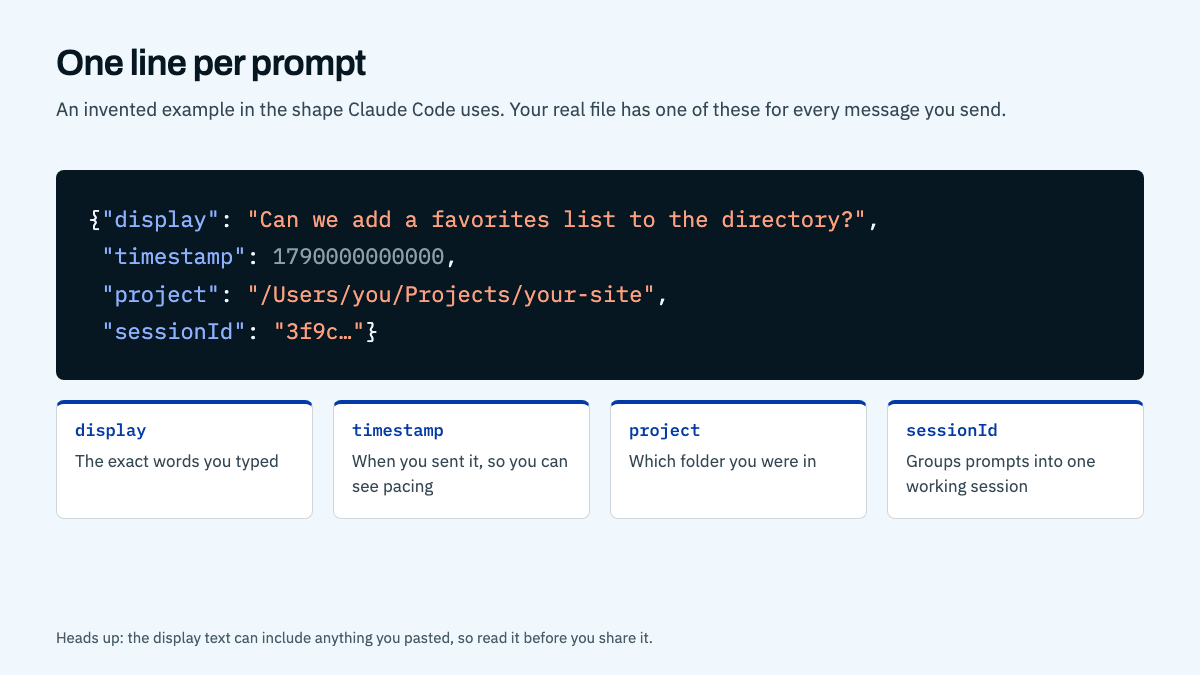
That’s enough to answer a surprising number of questions about how you work.
What I did with it
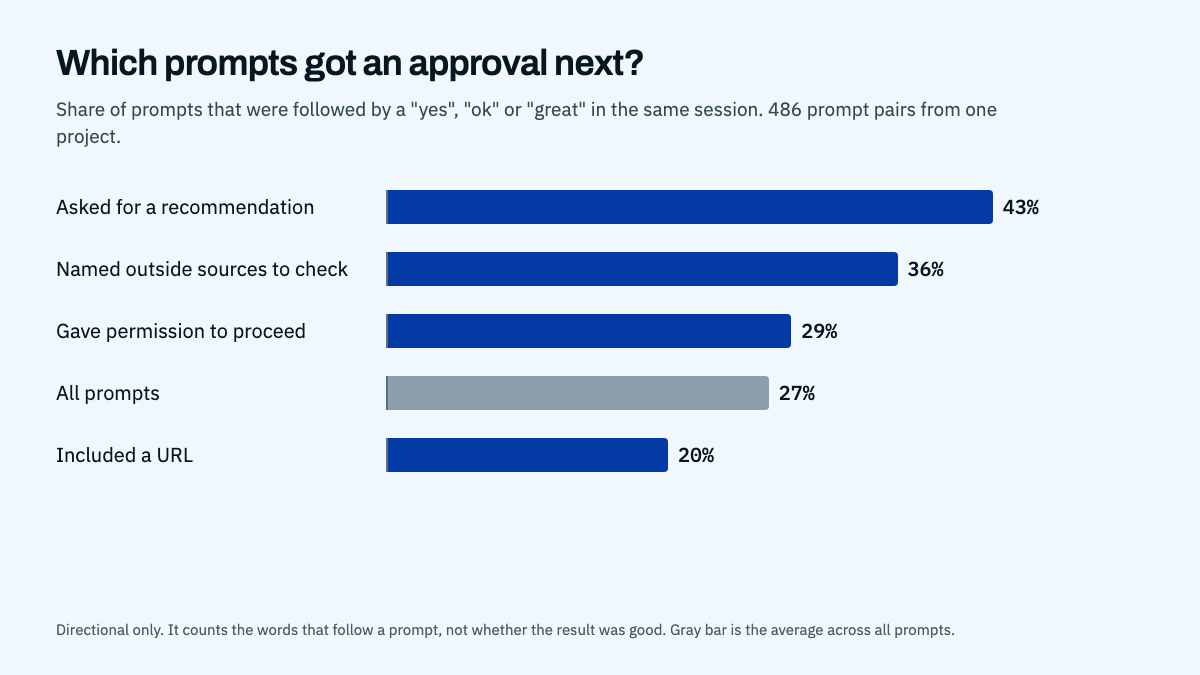
I filtered the file down to one project, my Bloomington directory and 3D map site, which came to about 500 prompts. Then I did something simple. I paired every prompt with the one that came right after it in the same session, and I looked at what the follow-up said.
If the next message started with “yes” or “perfect,” that was a good sign. If it started with “still not working” or “that’s wrong,” something had gone sideways.
A word of caution before the numbers. This is a rough read. It counts words, not quality, and when I checked the flagged “corrections” by hand, about half were new tasks that happened to contain a word like “should.” Treat everything below as a direction, not a measurement.
What stood out
I ask for recommendations, then approve them
About one in ten of my prompts asks Claude what it thinks: what to do next, what I’m missing, what it would add with free rein. Those prompts were followed by an approval more often than any other kind, 43 percent of the time against 27 percent overall.
Specific beats short, until the plan is settled
My longest, most detailed prompts (over 200 characters) were followed by a correction under 2 percent of the time. Once a plan was agreed, my short replies like “yes, merge and deploy” almost never needed a redo. Detail up front saves a round trip later.
Naming the sources works
When I told Claude where to check, such as Google Business, Yelp or an official site, I got approval 36 percent of the time. I was handing over the standard of proof along with the task.
Where the rework really came from
This was the most useful part. The rework wasn’t about how I phrased things. It came from two places:
- A feature that needed testing with real input before I called it finished. My photo upload form was the clearest case.
- Real-world facts that Claude couldn’t know, like whether a business is still operating.
Both have fixes. Ask for an end-to-end test before something ships. Give the ground truth up front, or tell Claude exactly where to verify it.
The best prompts hand over the task and the standard for finishing it.
Why a security-minded developer cares
Simon uses the file when clients ask for help securing their app and following best practices. That makes sense to me. A prompt history shows how a project was actually built, and a vibe-coded app can look finished long before anyone has asked the hard questions about it.
His tip works on both sides. If you’re the one building, you can find your own gaps. If you’re the one reviewing, you can see the story behind the code.
One warning from my own read. Your history can contain everything you ever pasted into a prompt, including keys, passwords, client names and private notes. Read it before you hand it to anyone, and remove what shouldn’t leave your machine. I kept my real prompts out of this post for that reason, and the examples in the images are invented.
Try it yourself
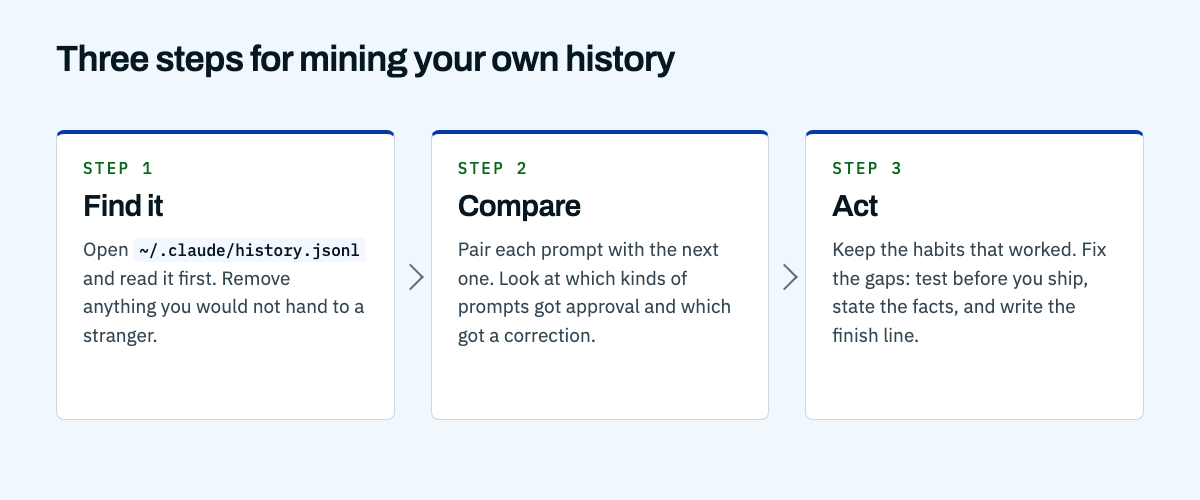
- Find it. Open
~/.claude/history.jsonland read it first. - Compare. Pair each prompt with the next and see which kinds got approval and which got a correction.
- Act. Keep the habits that worked. Fix the gaps, especially testing and stating facts.
You can ask Claude to do the pairing for you. I did, and it took a few minutes.
If your AI-built app needs a second look
If you have an app that came together quickly with AI help and you’re not sure it’s ready for real users, Simon and the team at Future Wonder do this work. If your website needs the same honest check, that’s what I do at David Martin Design.
Thanks, Simon, for the tip.